ML Pipelines on Google Cloud
Overview
Week 1
Concepts of TFX (TensorFlow Extended)
-
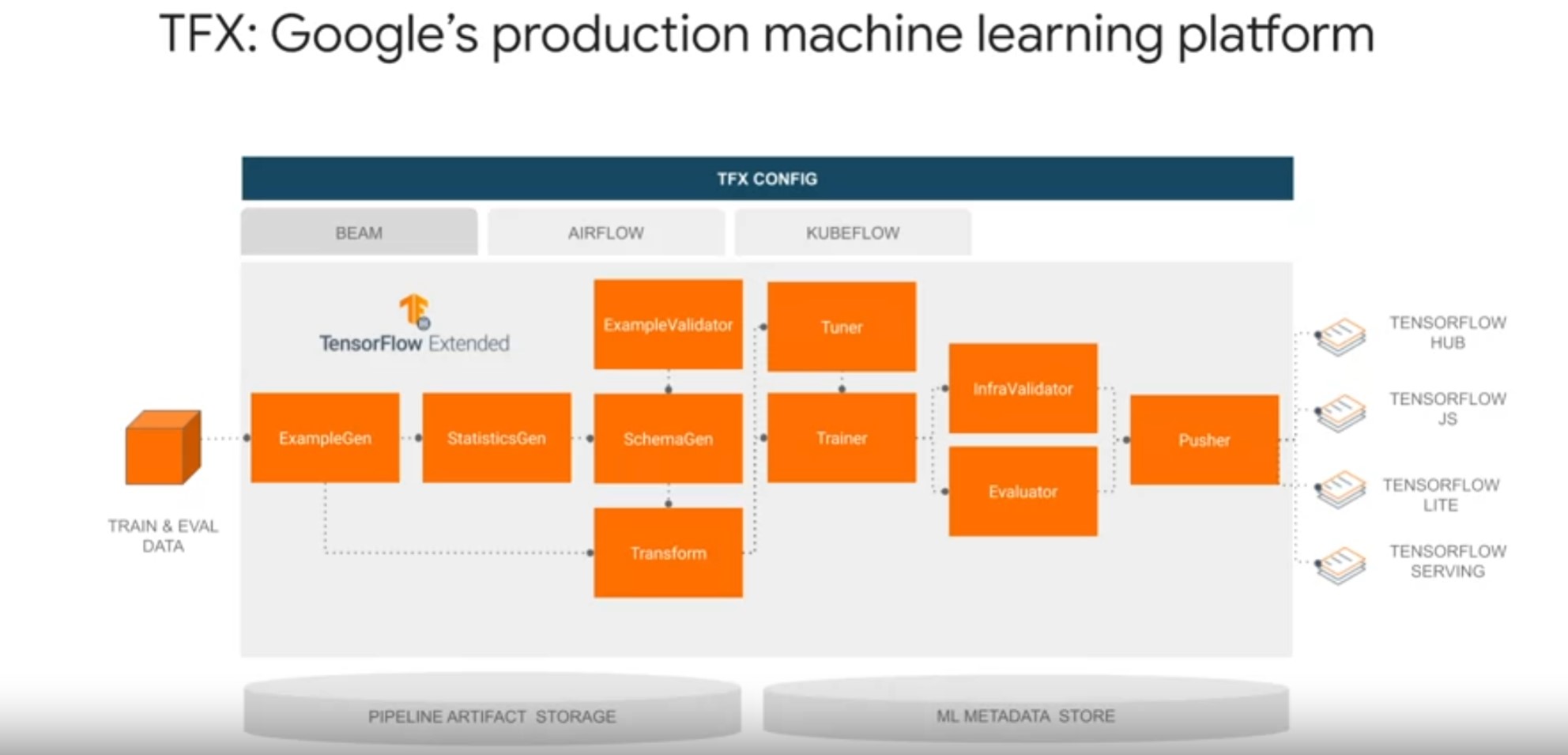
TFX is a Google production-scale machine learning platform based on the TensorFlow ecosystem, widely used internally at Google and fully open-sourced in 2019.
-
It provides a flexible configuration framework and shared libraries to integrate common machine-learning tests, implemented this components needed to define, launch, and monitor your machine learning system.
-
TFX makes MLOps easier through all phases of the machine learning project life cycle from prototyping to production.
-
It is designed to orchestrate your machine learning workflow with portability to multiple environments and orchestration frameworks including Apache Airflow, Apache Beam, and Kubeflow.
-
TFX already supports four standard deployment targets for TensorFlow models.
- Deployment to TF Serving a high-performance Production machine-learning model server for batch and streaming inference.
- Deployment through a TF light model converter for inference on IoT and mobile devices.
- Deployment to web browsers through TensorFlow JS for lowly and C web applications.
- Deployment to TFO, a model repository for model sharing and transfer learning.
-
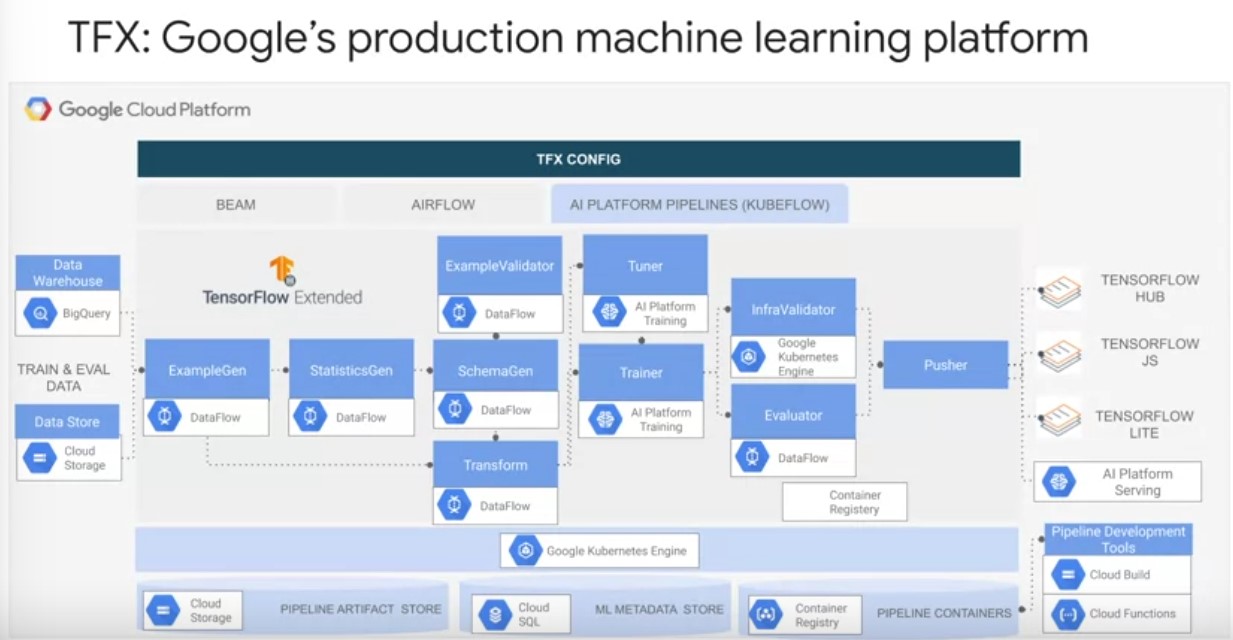
It is also portable to different computing platforms, including on-premise and Cloud providers such as Google Cloud.
-
TFX Concepts:
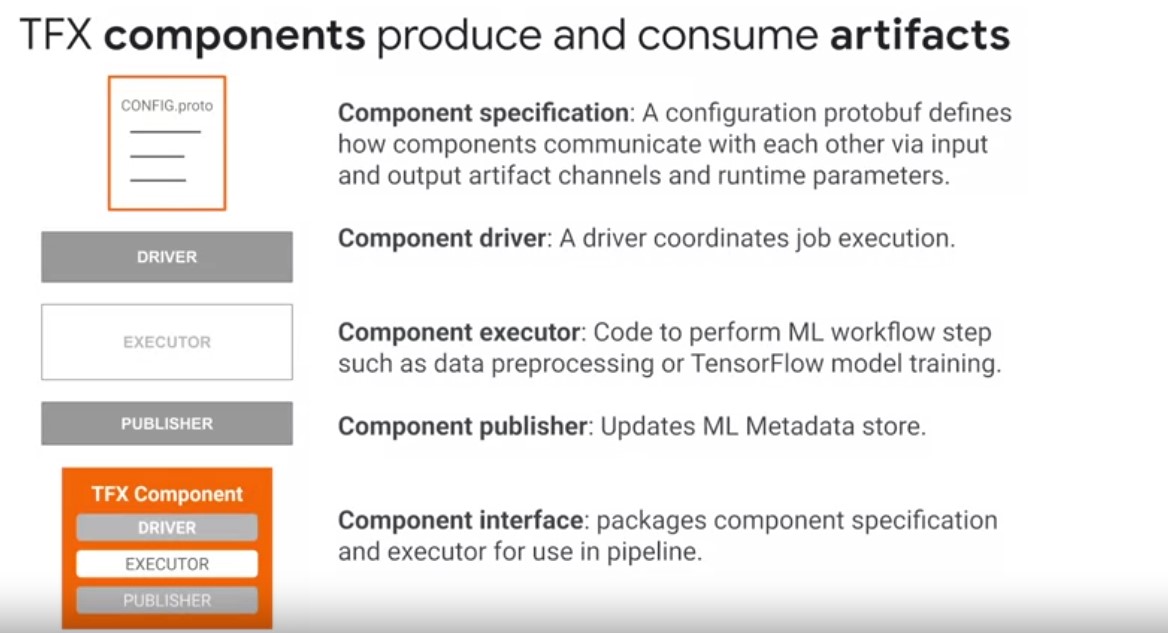
- A TFX component implements a machine learning task
- Each step of TFX pipeline is called a component produces and consumes structured data representations called artefacts.
- Components have 5 elements:
- Component specification - The component specification or components specs define how components communicate with each other. They described three important details of each component: it’s input artifacts, output artifacts, and runtime parameters that are required during component execution. Components communicate through typed input and output channels. Components specs are implemented as protocol buffers, which are Google’s language-neutral, platform-neutral, extensible mechanism for serializing structured data similar to XML or JSON, but smaller, faster, and simple
- Component Driver class: component contains a driver class which coordinates compute job execution, such as reading artifact locations from the ML metadata store, retrieving artifacts from pipeline storage, and the primary executor job for transforming artifacts
- a component contains an executor class: which implements the actual code to perform a step of your machine learning workflow, such as ingestion or transformation on dataset artifacts
- a component contains a component interface, which packages the component specification and executer for use in a pipeline.
- a component interface packages the component specification, driver, executer, and publisher together as a component for use in a pipeline
TFX Components at runtime:
- Driver reads the component spec for parameters and artefacts and retrieves input artifcacts.
- Executer performs the computation
- the publisher reads the components specification to log the pipeline component run and ML metadata and write the components output artifacts to the artifacts store
- TFX pipelines are a sequence of components linked together by a directed acyclical graph of the relationships between artifact dependencies.
- They communicate through input and output channels.
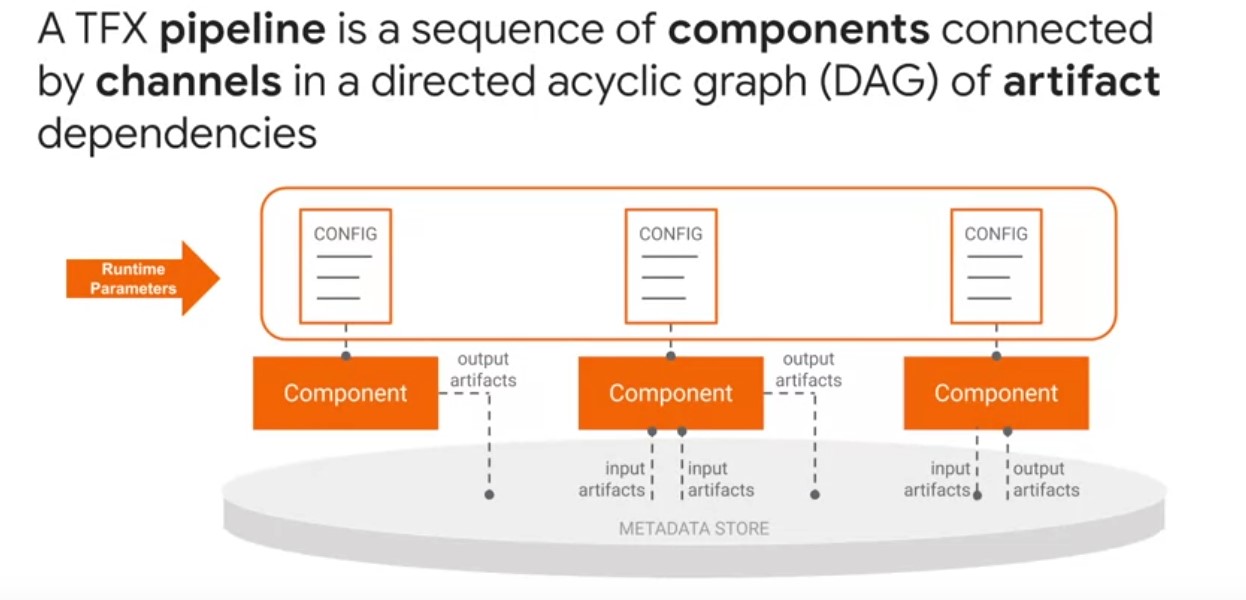
- TFX channel is an abstract concept that connects component data producers and data consumers.
- Component instances produce artifacts as outputs and depend on artifacts produced by upstream component instances as inputs.
- Parameters are inputs to pipelines that are known before pipeline is executed.
- Parameters let you change the behavior of a pipeline through configuration protocol buffers instead of changing your components and pipeline code.
- TFX pipeline parameters allow running pipeline fully or partially with different sets of parameters, such as training steps, data split spans, or tuning trials without changing pipelines code every time.
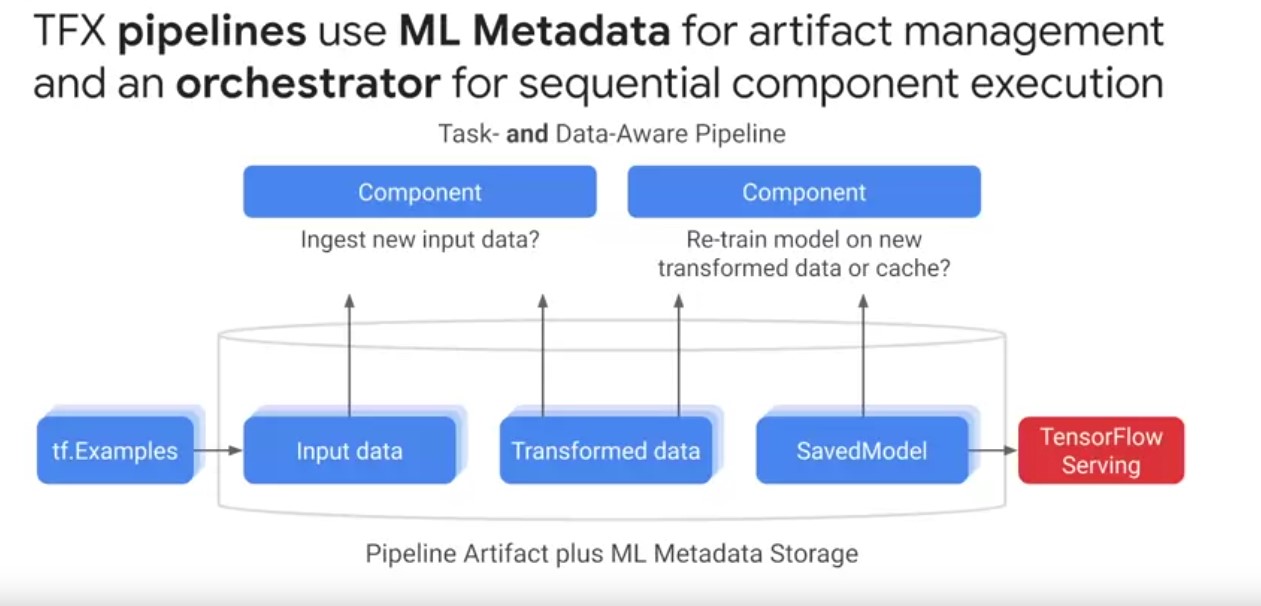
TFX MLData Store:TFX implements a metadata store using the ml metadata library, which is an open-source library to standardize the definition, storage, and querying metadata for ml pipelines.- The ml metadata libraries store the metadata in a relational backend.
- For notebook prototypes, this can be a local SQL database, and for production Cloud deployments, this could be a managed MySQL or Postgres database.
- ML metadata does not store the actual pipeline artifacts.
- Orchestrators coordinate pipeline runs specifically component executers sequentially from a directed graph of artifact dependencies.
- Orchestrators ensure consistency with pipeline execution order, component logging, retries and failure recovery, and intelligent parallelization of component data processing.
- TFX pipelines are task aware, i.e. that they can be authored in a script or a notebook to run manually by the user as a task.
- A task can be an entire pipeline run or a partial pipeline run of an individual component and its downstream components.
- TFX pipelines are both task and data-aware pipelines. Data-aware means TFX pipelines store all the artifacts from every component over many executions so they can schedule component runs based on whether artifacts have changed from previous runs.
- Pipeline automatically checks whether re-computation of artifacts, such as large data ingestion and transformation tests is necessary when scheduling component runs.
TFX Horizontal Layers:
-
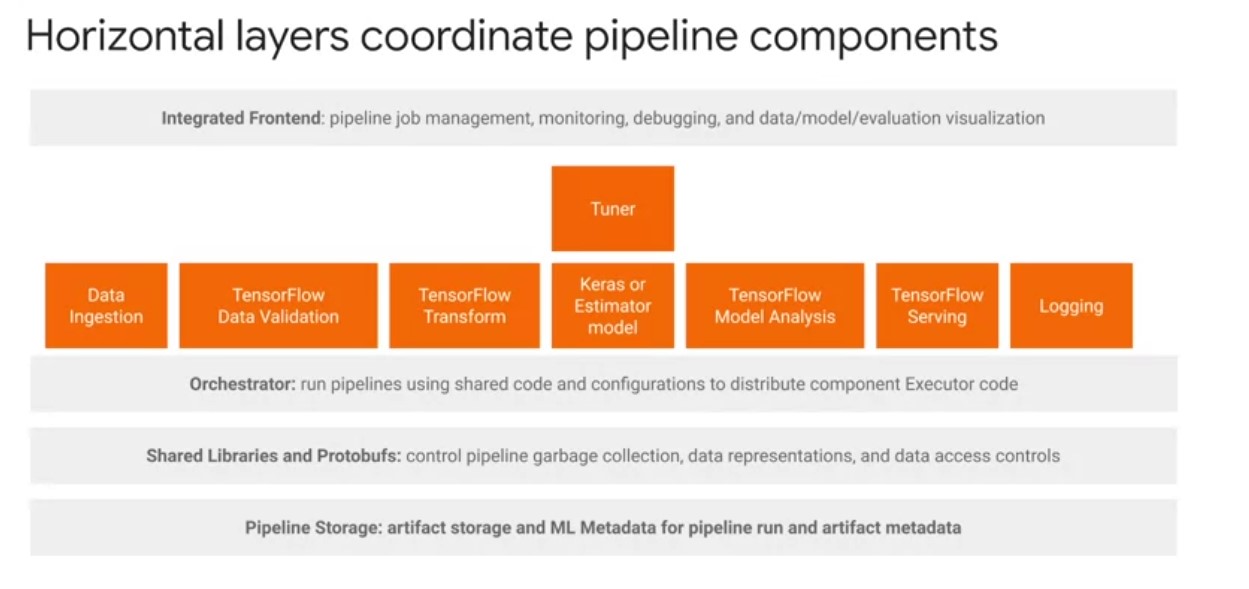
TFX horizontal layers coordinate pipeline components. These are primarily shared libraries of utilities and protobufs for defining abstractions that simplify the development of TFX pipelines across different computing and orchestration environments. For most machine learning cases with TFX, you will only interact with the integrated front-end layer and don’t need to engage directly with the orchestrator, shared libraries, and ML metadata unless you need additional customization. At a high level, there are four horizontal layers to be aware of.
-
4 horizontal layers:
- An integrated frontend enables GUI-based controls over pipeline job management, monitoring, debugging, and visualization of pipeline data models and evaluations.
- Orchestrators come integrated with their own frontends for visualizing pipeline-directed graphs. Orchestrators run TFX pipelines with shared pipeline configuration code and produce. All orchestrators inherit from a TFX runner class. TFX orchestrators take the logical pipeline object, which can contain pipeline args components and a DAG, and are responsible for scheduling components of the TFX Pipelines sequentially based on the artifact dependencies defined by the DAG. There are also shared libraries and protobufs that create additional abstractions to control pipeline garbage collection, data representations, and data access controls. An example is the TFXIO library, which defines a common in-memory data representation shared by all TFX libraries and components in an I/O abstraction layer to produce such representations based on Apache Arrow.
- Finally, you have pipeline storage. ML metadata records pipeline execution metadata and artifact path locations to share across components. You also have pipeline artifacts Storage, which automatically organizes artifacts on local or remote Cloud file systems
TFX Standard Data Components:
- Standard and custom compoenents can be mixed.
- Each standard compoennt is designed around common machine learning tasks.
ExampleGen TFX Pipeline Compoenent:
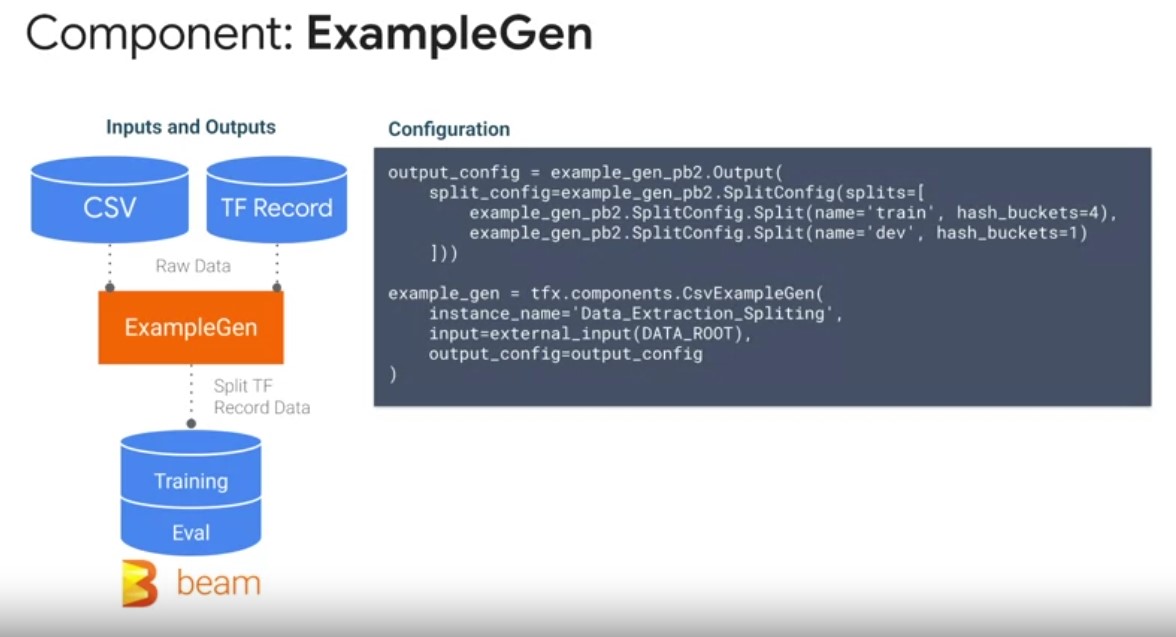
- The entry point to your pipeline, that ingests data.
- As inputs, ExampleGen supports out-of-the-box ingestion of external data sources such as CSV, TF Records, Avro, and Parquet.
- As outputs, ExampleGen produces TF examples, or TF sequence examples which are highly efficient in performant data set representations, that can be read consistently by downstream components.
- This comes with directory of management and logging by default to ensure ML best practices on consistent projects setup.
- ExampleGen brings configurable, and reproducible data partitioning and shuffling into TF Records, a common data representation used by all components in your pipeline.
- leverages Apache Beam for scalable, fault-tolerant data ingestion.
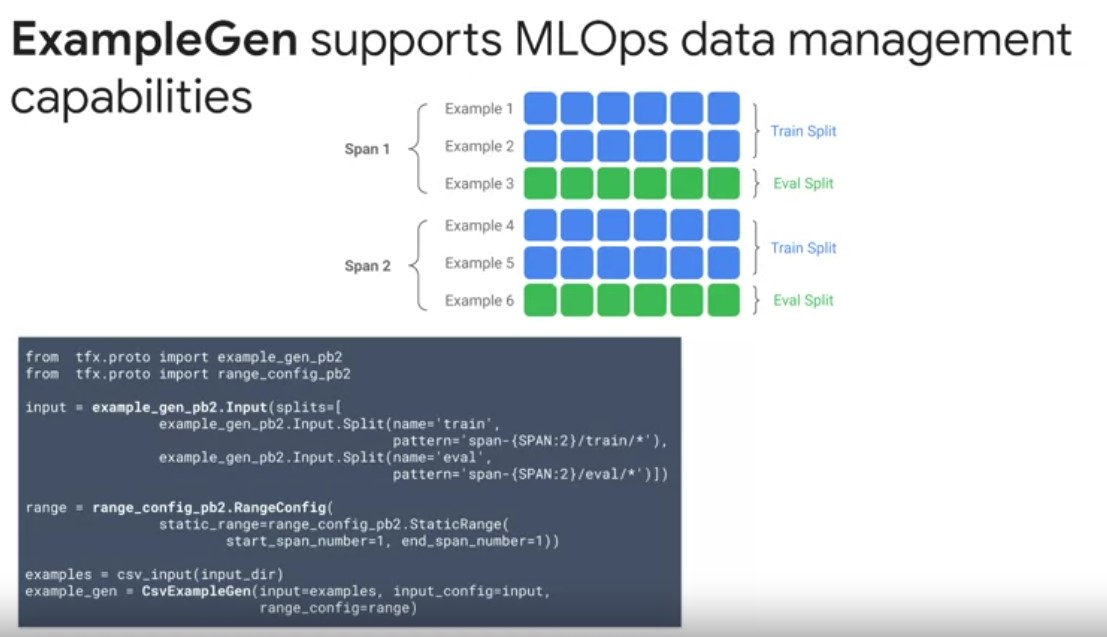
- ExampleGen supports advanced data management capabilities such as data partitioning, versioning, and custom splitting on features, or time.
- TFX organizes data using several abstractions, with a hierarchy of concepts named spans, versions and splits. A span is a grouping of training examples. If your data is persisted on a file system, each span may be stored in a separate directory. The semantics of a span are not hard-coded into TFX. A span may correspond to a day of data or any other grouping that is meaningful to your task. In the example on the slide, you can see that you’re using an input configuration to either ingest pre-split data or split the data for you based on the glob file patterns. The splitting method can also be specified to use features like time, or an ID field that indicates entities, like a customer ID. You can also further customize which spans your pipeline operates over, as part of your experiments using the Range Config.
- Each span can hold multiple versions of data. For example, if you were to remove some examples from a span to clean up poor data quality, this could result in a new version of that span.
- By default, TFX components operate on the latest version within a span.
- Each version within a span can further be subdivided into multiple splits. The most common use case for splitting a span is to split it into Train, Dev, Test data partitions.
StatisticsGen
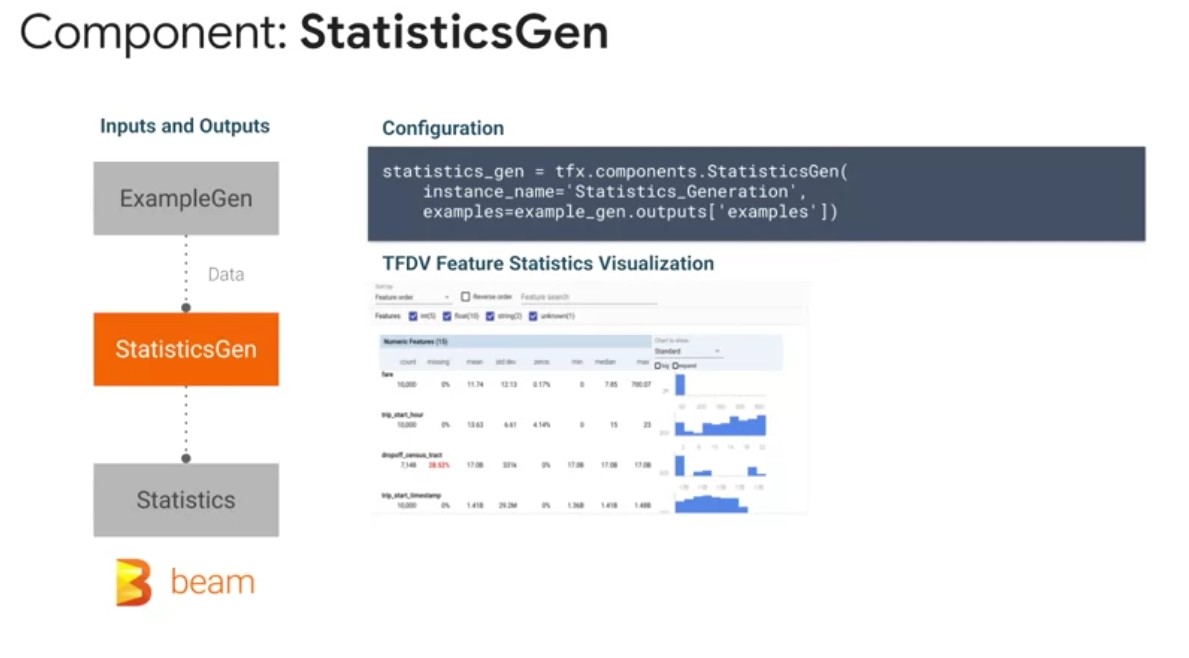 StatisticsGen performs a complete pass over your data, using
Apache Beam, and the TensorFlow Data Validation Library, to
calculate summary statistics for each of your features over your
configured Train, Dev and Test splits. This includes statistics
like mean, standard deviation, quantile ranges, and the
prevalence of null values. As inputs, this StatisticsGen
component is configured to take in TF examples from the
ExampleGen component. As outputs, StatisticsGen produces a data
set statistics artifact, that contains features statistics used
for downstream components. Incorporating StatisticsGen into your
machine learning project life cycle gives you several
benefits. StatisticsGen uses the TensorFlow Data Validation
library that comes with pre-built utilities and best practices
for calculating future statistics, and identifying data anomalies
that can negatively affect your model’s performance. Second,
StatisticsGen also uses Apache Beam to compute full-pass data set
features statistics for downstream visualization and
transformations. This allows your pipeline to scale data set
statistical summaries as your data grows, with built-in logging,
and fault tolerance for debugging.
StatisticsGen performs a complete pass over your data, using
Apache Beam, and the TensorFlow Data Validation Library, to
calculate summary statistics for each of your features over your
configured Train, Dev and Test splits. This includes statistics
like mean, standard deviation, quantile ranges, and the
prevalence of null values. As inputs, this StatisticsGen
component is configured to take in TF examples from the
ExampleGen component. As outputs, StatisticsGen produces a data
set statistics artifact, that contains features statistics used
for downstream components. Incorporating StatisticsGen into your
machine learning project life cycle gives you several
benefits. StatisticsGen uses the TensorFlow Data Validation
library that comes with pre-built utilities and best practices
for calculating future statistics, and identifying data anomalies
that can negatively affect your model’s performance. Second,
StatisticsGen also uses Apache Beam to compute full-pass data set
features statistics for downstream visualization and
transformations. This allows your pipeline to scale data set
statistical summaries as your data grows, with built-in logging,
and fault tolerance for debugging.
SchemaGen
-
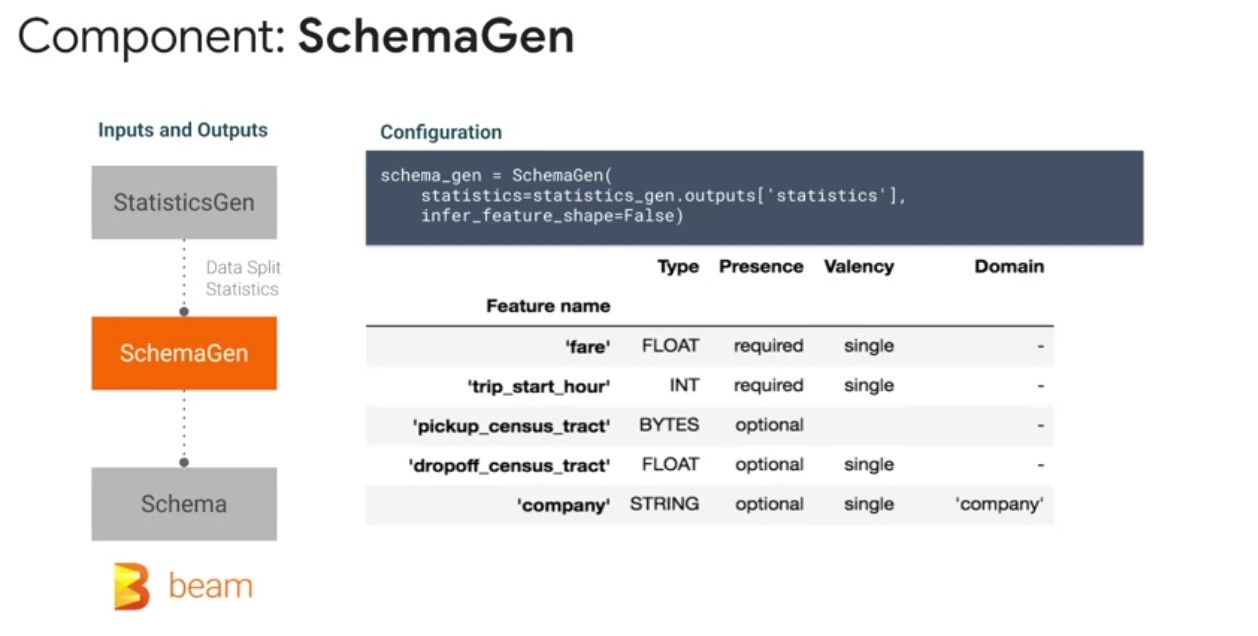
Some TFX components use a description of your input data called a schema that can be automatically generated by the SchemaGen component.
-
As input, SchemaGen reads the StatisticsGen artifact to infer characteristics of your input data from the observed feature data distributions.
-
As output, SchemaGen produces a schema artifact, a schema.proto description of your data’s characteristics. One of the benefits of using TensorFlow Data Validation is that the SchemaGen component can be configured to automatically generate a schema by inferring types, categories in accepted ranges from their training data.
-
The schema is an instance of schema.proto. Schemas are a type of protocol buffer, more generally known as a protobuf.
-
The schema can specify datatypes for feature values, whether a feature has to be present in all examples, what are the allowed value ranges for each feature, and other properties? The SchemaGen, is an optional component that does not need to be run on every pipeline run, and instead it is typically run during prototyping and the initial pipeline run.
-
A key benefit of a schema file is that you’re able to reflect your expectations of your data in a common data description for use by all of your pipeline components. It also enables continuous monitoring of data quality during continuous training of your pipeline. The ExampleValidator pipeline component identifies anomalies and trained dev and test data. As inputs ExampleValidator readsfeature statistics from StatisticsGen in the schema artifact produced by this SchemaGen component, or imported from an external source.
ExampleValidator
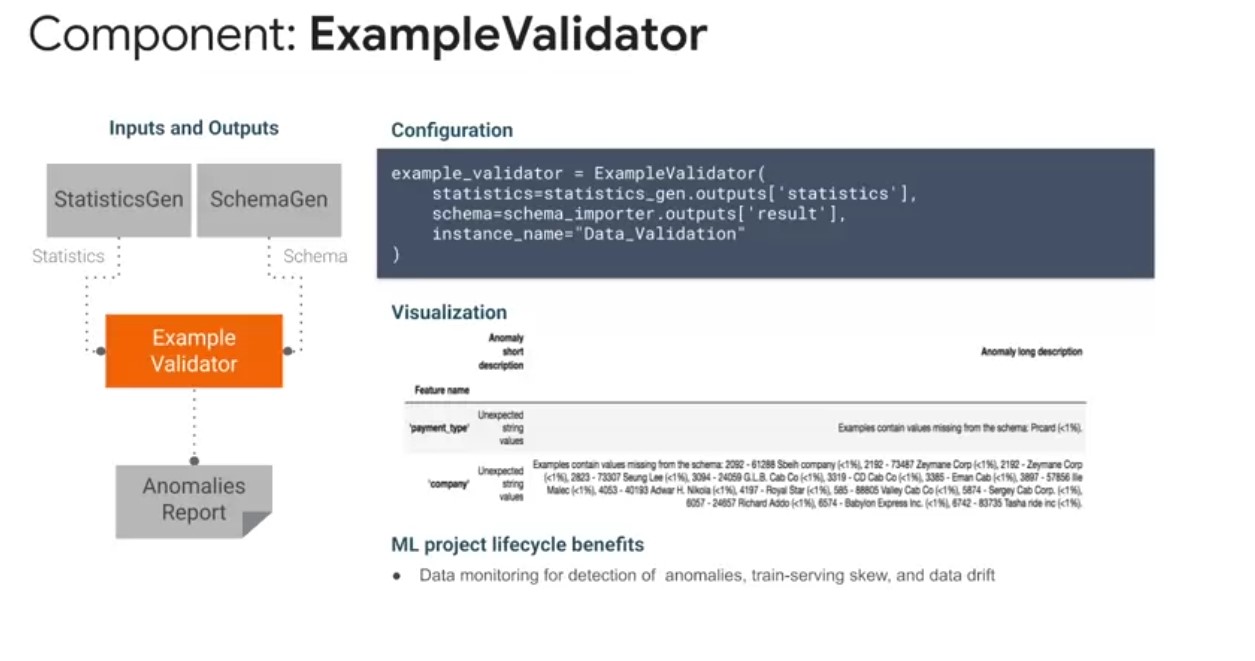 The ExampleValidator pipeline component identifies anomalies and
trained dev and test data. As inputs ExampleValidator
readsfeature statistics from StatisticsGen in the schema artifact
produced by this SchemaGen component, or imported from an
external source. As outputs, ExampleValidator outputs in
anomalies report artifact. The ExampleValidator pipeline
component identifies any anomalies in the example data by
comparing data statistics computed by the StatisticsGen pipeline
component against a schema. The key benefit of ExampleValidator
is that it can detect different classes of anomalies in the
data. For example, it can perform validity checks by comparing
data sets statistics against a schema, di-codifies expectations
of the user. It can detect feature, train serving skew by
comparing training and serving data. It can also detect data
drift by looking at a series of feature data across different
data splits. When applying machine learning to real-world data
sets, a lot of effort is required to preprocess your data into a
suitable format. This includes converting between formats,
tokenizing and stemming texts, forming vocabularies, performing a
variety of numerical operations such as normalization.
The ExampleValidator pipeline component identifies anomalies and
trained dev and test data. As inputs ExampleValidator
readsfeature statistics from StatisticsGen in the schema artifact
produced by this SchemaGen component, or imported from an
external source. As outputs, ExampleValidator outputs in
anomalies report artifact. The ExampleValidator pipeline
component identifies any anomalies in the example data by
comparing data statistics computed by the StatisticsGen pipeline
component against a schema. The key benefit of ExampleValidator
is that it can detect different classes of anomalies in the
data. For example, it can perform validity checks by comparing
data sets statistics against a schema, di-codifies expectations
of the user. It can detect feature, train serving skew by
comparing training and serving data. It can also detect data
drift by looking at a series of feature data across different
data splits. When applying machine learning to real-world data
sets, a lot of effort is required to preprocess your data into a
suitable format. This includes converting between formats,
tokenizing and stemming texts, forming vocabularies, performing a
variety of numerical operations such as normalization.
Transform
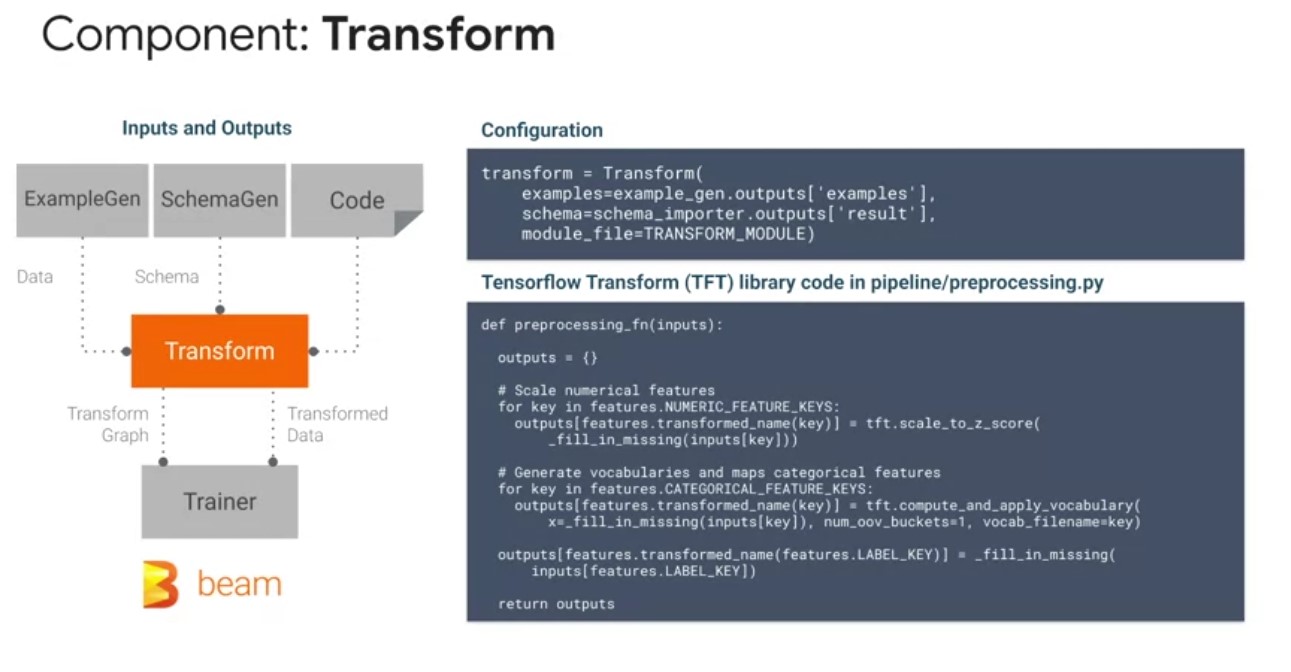
- TF Transform library which underpins the transform tfx compoenent helps with converting between formats, tokenizing and stemming texts, forming vocabularies, numerical operations such as normalization.
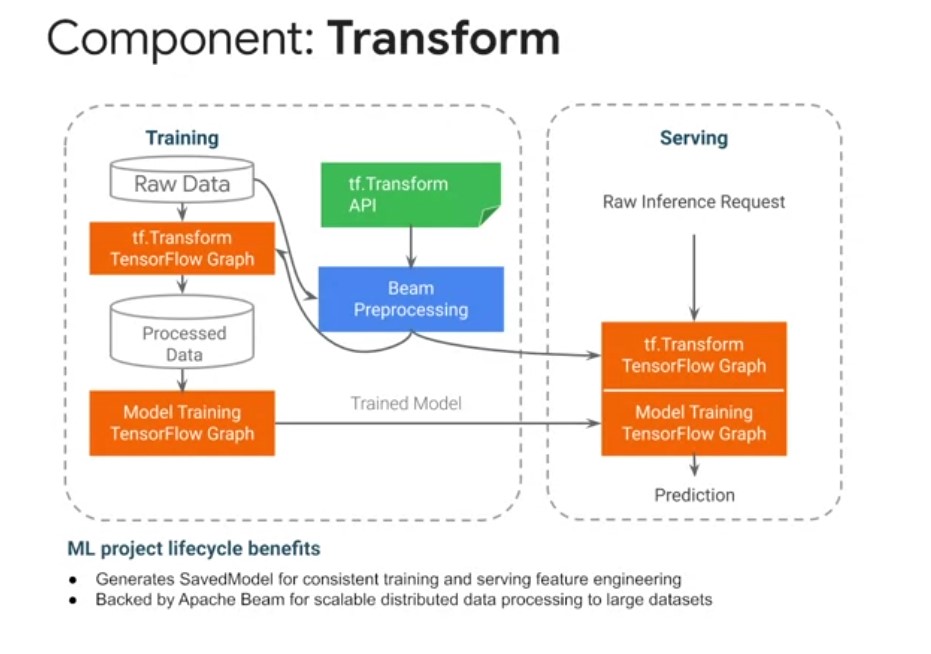
- The Transform TFX pipeline component performs feature engineering on the TF examples data artifact emitted from the ExampleGen component, using the data schema artifact from the SchemaGen, or imported from external sources, as well as TensorFlow transformations typically defined in a preprocessing function as shown in the example on the slide.
- As outputs, the transform component emits a saved model artifact, and it encapsulates feature engineering logic.
- When executed, the saved model will accept TF Examples emitted from an ExampleGen component, and emit the Transform feature data. It also emits a transform data artifact that is directly used by your model during training.
- Some of the most common transformations include, converting sparse categorical features into dense embedding features, automatically generating vocabularies, normalizing continuous numerical features, bucketizing continuous numerical features into discrete categorical features, as well as enriching text features.
- The transform component brings consistent feature engineering at training and serving time to benefit your machine learning project.
- By including feature engineering directly into your model graph, you can reduce train-serving skew from differences in feature engineering, which is one of the largest sources of error in production machine learning systems.
- Transform, like many other TFX components, is also underpinned by Apache Beam, so you can scale up your feature transformations using distributed compute as your data grows.
TFX Standard Model Components:
Trainer Component
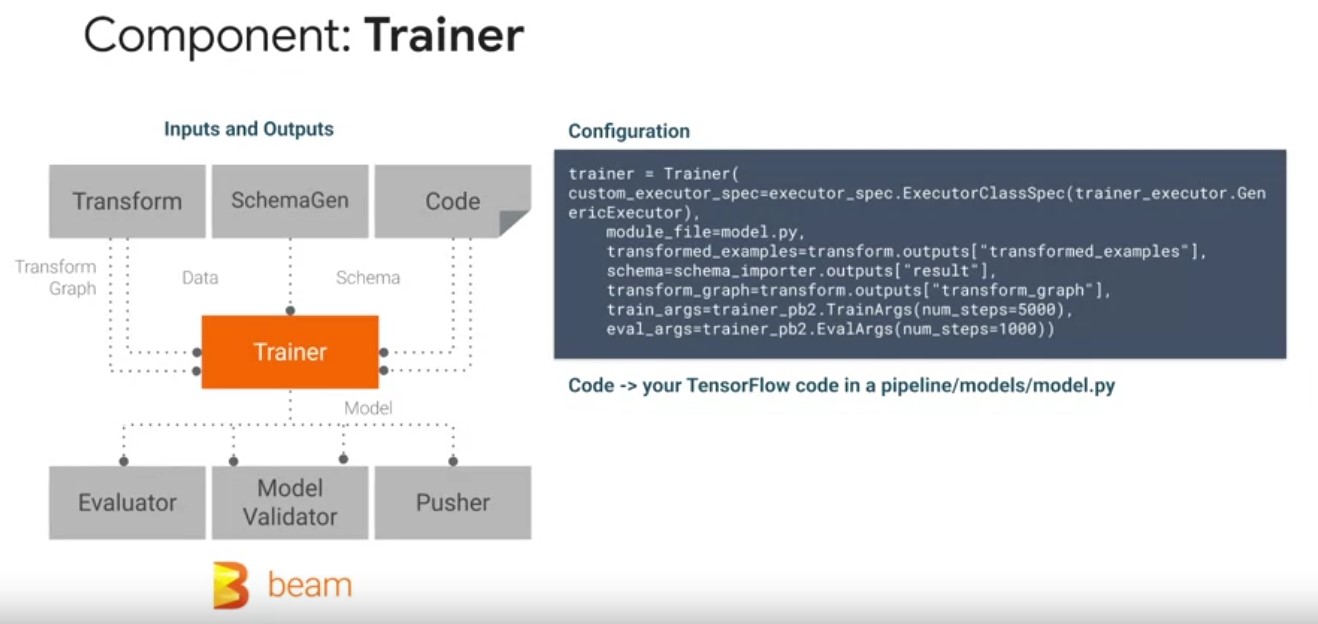 the trainer TFX pipeline component which trains a tensor flow
model. It supports TF1 estimators and native TF2 Keras models via the
generic executor. Trainers component spec also allows you to
parameterize your training and evaluation arguments, such as the
number of steps as shown in the example on the screen. As inputs, the
trainer component reads, a transform TF examples state artifact and
transform graph produced by the transform component. Play video
starting at ::34 and follow transcript0:34 A data schema artifact from
the SchemaGen component, that trainer checks its input data features
against. And your TensorFlow modeling code typically defined in a
model.py file. Play video starting at ::46 and follow transcript0:46
The trainer component produces at least one model for inference and
serving in a TensorFlow saved model format. A safe model contains a
complete TensorFlow program, including weights and computation.
the trainer TFX pipeline component which trains a tensor flow
model. It supports TF1 estimators and native TF2 Keras models via the
generic executor. Trainers component spec also allows you to
parameterize your training and evaluation arguments, such as the
number of steps as shown in the example on the screen. As inputs, the
trainer component reads, a transform TF examples state artifact and
transform graph produced by the transform component. Play video
starting at ::34 and follow transcript0:34 A data schema artifact from
the SchemaGen component, that trainer checks its input data features
against. And your TensorFlow modeling code typically defined in a
model.py file. Play video starting at ::46 and follow transcript0:46
The trainer component produces at least one model for inference and
serving in a TensorFlow saved model format. A safe model contains a
complete TensorFlow program, including weights and computation.
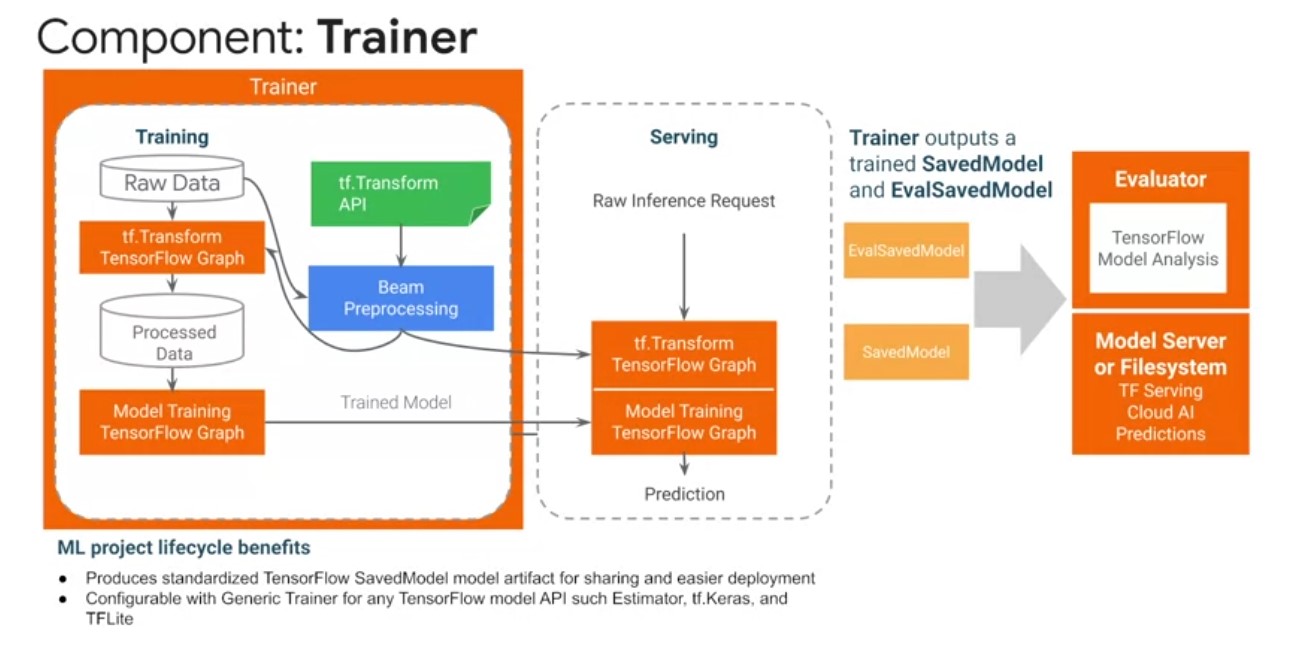
Optionally, another model for evaluation such as in a Val saved model we’ll also be emitted. The Val saved model contains additional information that allows the TensorFlow model analysis library. To compute the same evaluation metrics defined in the model in a distributed manner over a large amount of data and user defined slices. Trainer brings standardization to your machine learning projects. Play video starting at :1:25 and follow transcript1:25 The saved model format does not require the original model building code to run, which makes it useful for sharing and deploying. By exporting standardized model formats, you can more easily share your models on platforms like TF hub and deploy them across a variety of platforms. Such as the browser with TensorFlow JS, and mobile phones and edge devices, with TF light through the model rewriting library. You also inherit the benefits of using TensorFlow for accelerating your model training, such as the TF distribute APIs, for distributing training across multiple cores and machines. And utilizing hardware accelerators like GPUs and TPUs for training.
Tuner Component:
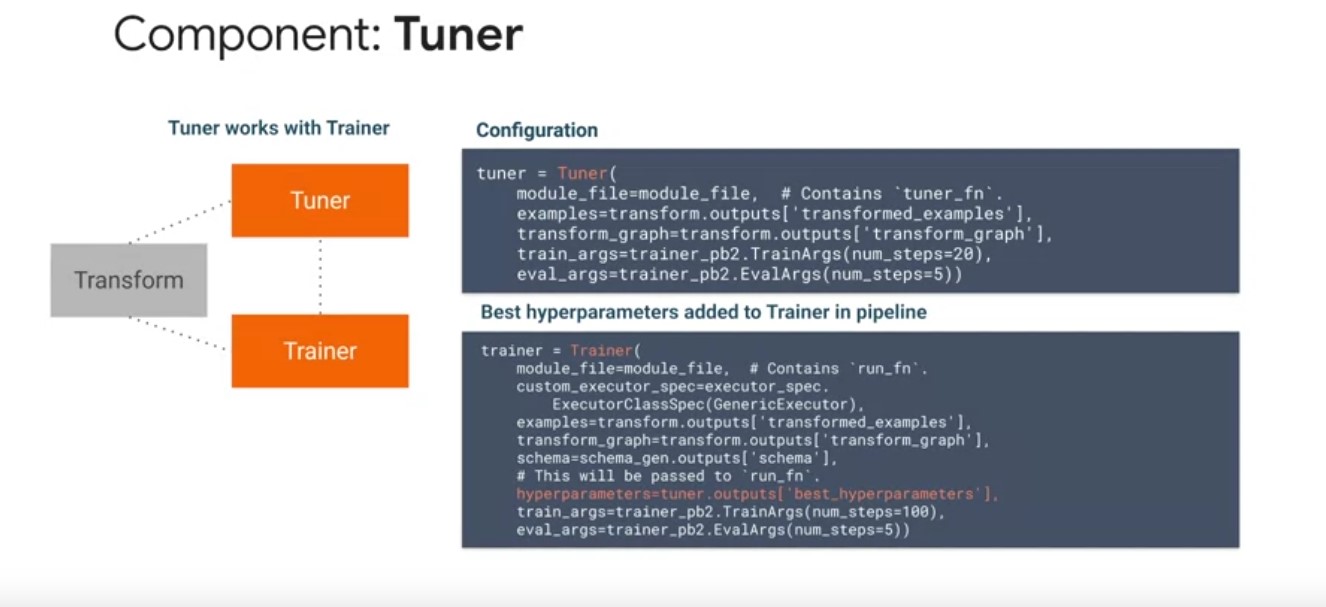 The Tuner component is the newest T effects component and makes
extensive use of the Python Keras tuner API for tuning hyper
parameter. As inputs, the tuner component takes in the transformed
data in transform graph artifacts, as outputs, the tuner components
output a hyper parameter artifact. You can modify the trainer
configurations to directly ingest the best hyper parameters, found
from the most recent tuner run. Play video starting at :2:38 and
follow transcript2:38 You typically don’t run the tuner component on
every run, due to the computational cost and time but instead
configure it for one off execution. When running on Google Cloud, the
tuner component can take advantage of two services, AI platform
optimizer, VI cloud tuner implementation and AI platform
training. Which can be used as a flock manager for distributed to new
jobs. Play video starting at :3:4 and follow transcript3:04 The tuner
component brings the benefits of tight integration with the trainer
component to perform hyper parameter tuning in a continuous training
pipeline. Play video starting at :3:14 and follow transcript3:14 You
can also perform distributed tuning by running parallel trials on
Google Cloud to significantly speed up your tuning jobs.
The Tuner component is the newest T effects component and makes
extensive use of the Python Keras tuner API for tuning hyper
parameter. As inputs, the tuner component takes in the transformed
data in transform graph artifacts, as outputs, the tuner components
output a hyper parameter artifact. You can modify the trainer
configurations to directly ingest the best hyper parameters, found
from the most recent tuner run. Play video starting at :2:38 and
follow transcript2:38 You typically don’t run the tuner component on
every run, due to the computational cost and time but instead
configure it for one off execution. When running on Google Cloud, the
tuner component can take advantage of two services, AI platform
optimizer, VI cloud tuner implementation and AI platform
training. Which can be used as a flock manager for distributed to new
jobs. Play video starting at :3:4 and follow transcript3:04 The tuner
component brings the benefits of tight integration with the trainer
component to perform hyper parameter tuning in a continuous training
pipeline. Play video starting at :3:14 and follow transcript3:14 You
can also perform distributed tuning by running parallel trials on
Google Cloud to significantly speed up your tuning jobs.
Evaluator Component
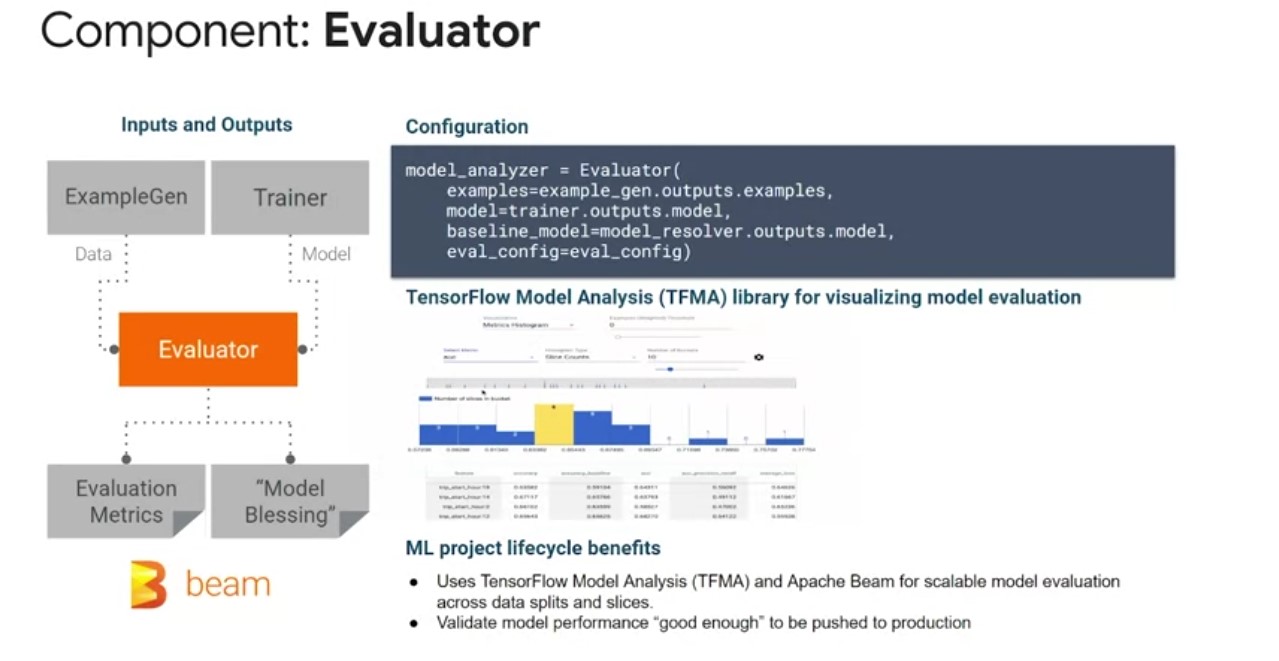
Now that you’ve trained your model in a TFX pipeline, how do you know how well it performed? Here comes the evaluator component for model performance evaluation as inputs. The evaluator component will use the model created by the trainer in the original input data artifact. It will perform a thorough analysis using the TensorFlow model analysis library. To compute mean machine learning metrics across data splits and slices, it’s typically not enough to look at high level results across your entire data set. You really need to go further than that and look at the individual slices of your data set and performance metrics. This is important because the experience of each user of your model will depend upon their individual data points. Play video starting at :4:6 and follow transcript4:06 As outputs the evaluator component produces two artifacts and evaluation metrics artifact that contains configurable model performance metrics slices. And a model blessing artifact that indicates whether the models performance was higher than the configured thresholds and that it is ready for production. Play video starting at :4:25 and follow transcript4:25 The benefits of evaluator can be summarized as bringing standardization to your machine learning projects for easier sharing and reuse.
Previously, many teams would write custom evaluation code that was buggy and hard to maintain with a lot of duplication and made it hard to replicate. Play video starting at :4:44 and follow transcript4:44 Evaluator also gives you the ability to get your pipeline from pushing the poor performing model to production and a continuous training scenario. Play video starting at :4:53 and follow transcript4:53 You can be assured that your pipeline will only graduate a model to production when it has exceeded the performance of previous models.
Infravalidator Component
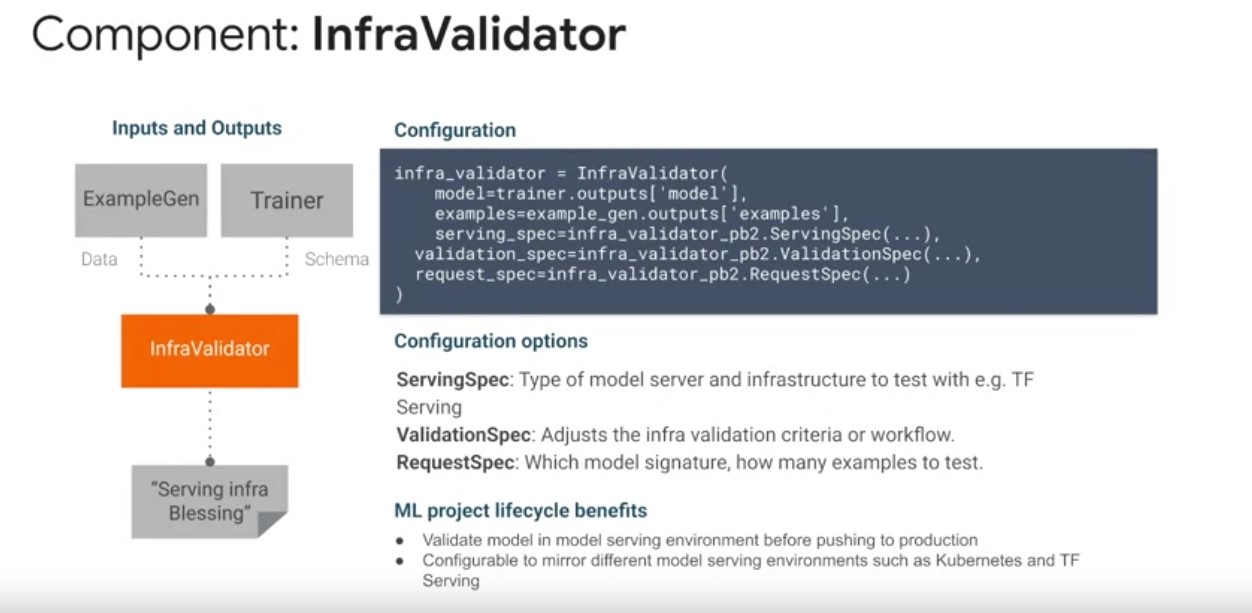 Next up is InfraValidator, which is a TFX component that is used as an
early warning layer before pushing a model to production. Play video
starting at :5:10 and follow transcript5:10 The name InfraValidator
came from the fact that it is validating the model in the actual model
serving infrastructure. If evaluator guarantees that performance of
the model, InfraValidator guarantees that the model is mechanically
fine, and it prevents bad models from being pushed to production. As
inputs InfraValidator takes the saved model artifact from the trainer
component. Launches a sandbox model server with the model and test
whether it can be successfully loaded and optionally queried using the
input data artifact from the example Gen component. Play video
starting at :5:47 and follow transcript5:47 The resulting output
InfraValidation artifact will be generated in the blessed output in
the same way that evaluator does. Play video starting at :5:58 and
follow transcript5:58 InfraValidator focuses on the compatibility
between the model server binary, such as TensorFlow serving, and the
model ready to deploy. Despite the name InfraValidator, it is the
users responsibility to configure the environment correctly. And
InfraValidator only interacts with the model server in the user
configured environment to see whether it works well. Play video
starting at :6:20 and follow transcript6:20 Configuring this
environment correctly will ensure that InfraValidation, passing or
failing indicates whether the model would be survivable in the
production serving environment. Play video starting at :6:31 and
follow transcript6:31 InfraValidator brings an additional validation
check to your T effects pipeline by ensuring that only top performing
models are graduated production and that they do not have any failure
causing mechanical issues. Play video starting at :6:44 and follow
transcript6:44 InfraValidator brings standardization to this model
infra check and is configurable to mirror model serving environments
such as Kubernetes clusters and TF serving.
Next up is InfraValidator, which is a TFX component that is used as an
early warning layer before pushing a model to production. Play video
starting at :5:10 and follow transcript5:10 The name InfraValidator
came from the fact that it is validating the model in the actual model
serving infrastructure. If evaluator guarantees that performance of
the model, InfraValidator guarantees that the model is mechanically
fine, and it prevents bad models from being pushed to production. As
inputs InfraValidator takes the saved model artifact from the trainer
component. Launches a sandbox model server with the model and test
whether it can be successfully loaded and optionally queried using the
input data artifact from the example Gen component. Play video
starting at :5:47 and follow transcript5:47 The resulting output
InfraValidation artifact will be generated in the blessed output in
the same way that evaluator does. Play video starting at :5:58 and
follow transcript5:58 InfraValidator focuses on the compatibility
between the model server binary, such as TensorFlow serving, and the
model ready to deploy. Despite the name InfraValidator, it is the
users responsibility to configure the environment correctly. And
InfraValidator only interacts with the model server in the user
configured environment to see whether it works well. Play video
starting at :6:20 and follow transcript6:20 Configuring this
environment correctly will ensure that InfraValidation, passing or
failing indicates whether the model would be survivable in the
production serving environment. Play video starting at :6:31 and
follow transcript6:31 InfraValidator brings an additional validation
check to your T effects pipeline by ensuring that only top performing
models are graduated production and that they do not have any failure
causing mechanical issues. Play video starting at :6:44 and follow
transcript6:44 InfraValidator brings standardization to this model
infra check and is configurable to mirror model serving environments
such as Kubernetes clusters and TF serving.
Pusher Component
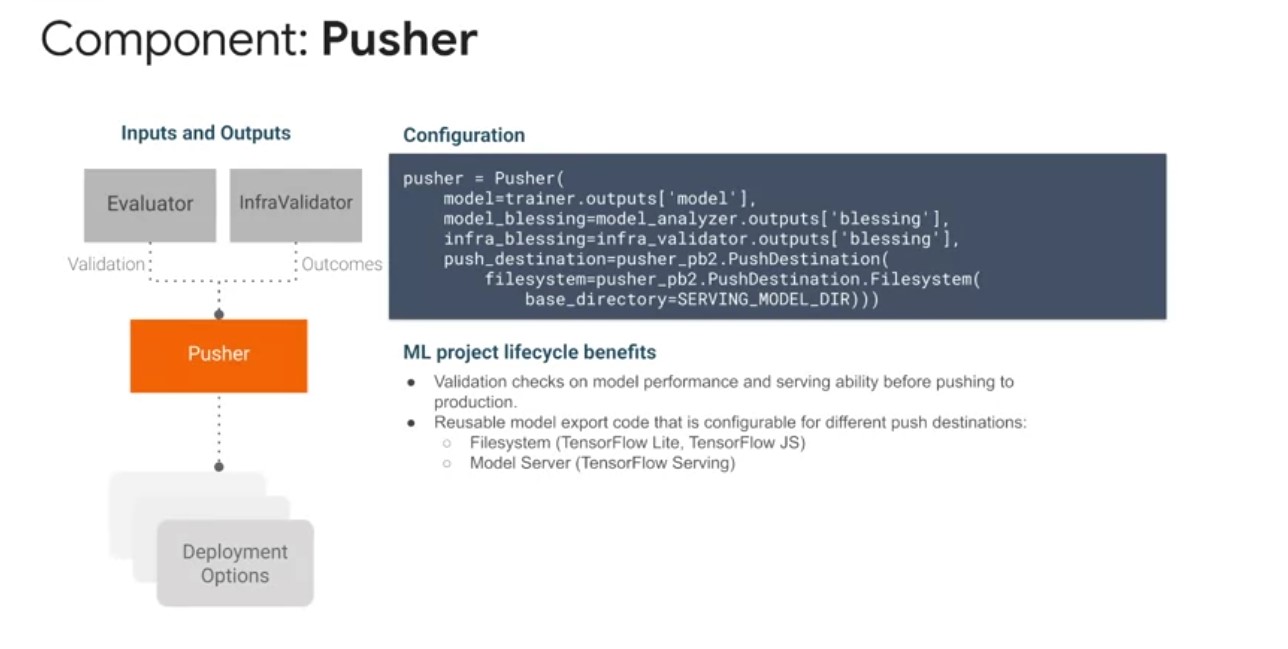
The Pusher component is used to push a validated model to a deployment target during model training or retraining. Play video starting at :7:4 and follow transcript7:04 Before the deployment pusher lives on one or more blessings from other validation componet as input to decide whether to push the model. Evaluator blesses the model if the new trained model is good enough to be pushed to production. InfraValidator blesses the model if the model is mechanically survivable in a production environment. As output a pusher component will wrap model versioning data with the train TensorFlow saved model for export to various deployment targets. Play video starting at :7:37 and follow transcript7:37 These targets may be TensorFlow light if you’re using a mobile application TensorFlow JS If you’re deploying in a JavaScript environment. Or TensorFlow serving, if you’re deploying to Claudia platform where it Kubernetes cluster. The pusher component brings the benefits of a production gatekeeper to your TFX pipeline. To ensure that only the best performing models that are mechanically sound, make it to production. Play video starting at :8:4 and follow transcript8:04 Machine learning systems are usually a part of larger applications. So having a check before production keeps your applications more reliable and available. Play video starting at :8:13 and follow transcript8:13 Finally, pusher standardizes the code for pipeline model export for reuse and sharing across machine learning projects. While still having the flexibility to be configured for file system, and model server deployments.
BulkInferer Component
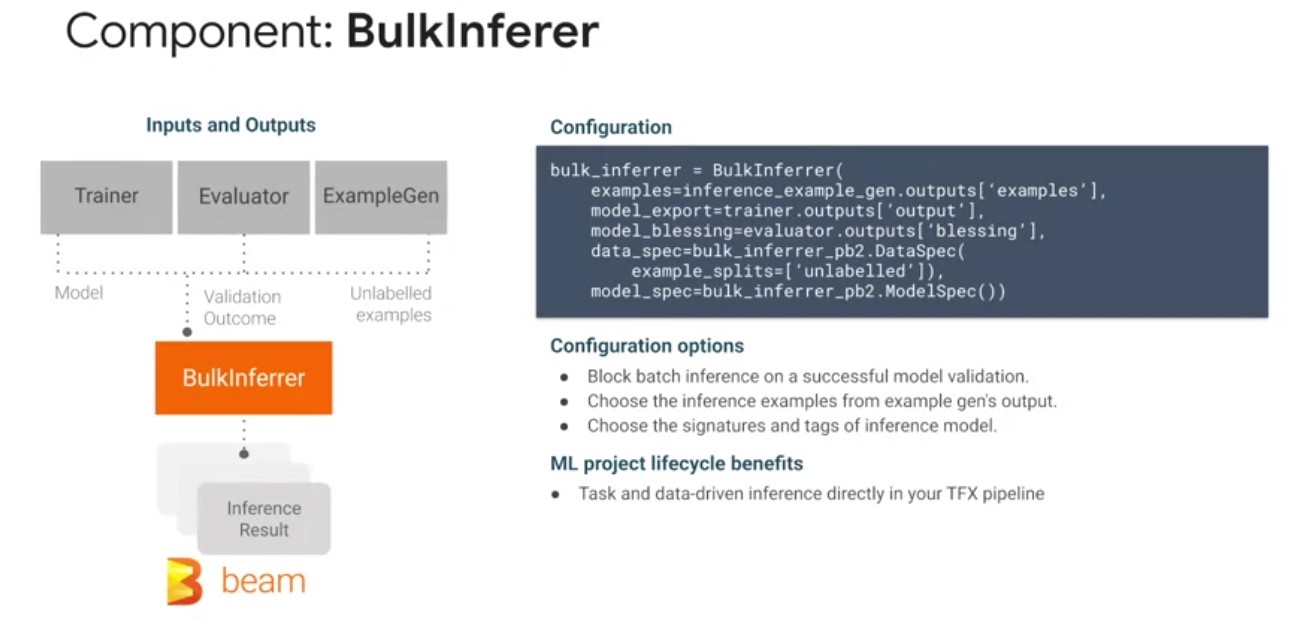
- Used to perform batch inference on unlabeled TF examples.
- Typically deployed after an evaluator component to perform inference with a validated model, or after the trainer component to directly perform inference on an exported model.
- Currently performs in memory model inference and remote inference. Remote inference requires the model to be hosted on cloud AI platform.
- As input bulkinferer reads from the following artifacts, a trained TensorFlow saved model from the trainer component, optionally a model blessing artifact from the evaluator component.
- Input data TF example artifacts from the example Gem component typically these would be unlabeled examples and the configured test data partition.
- As output bulk inferred generates a inference result proto, which contains the original features and the prediction results.
- Bulklnferer is a great option for your machine learning project to directly include inference in your pipeline if the use case is only batch inference. Doing so enables that you have tasks and data driven batch inference in a continuous training and inference pipeline.
TFX Pipeline Nodes
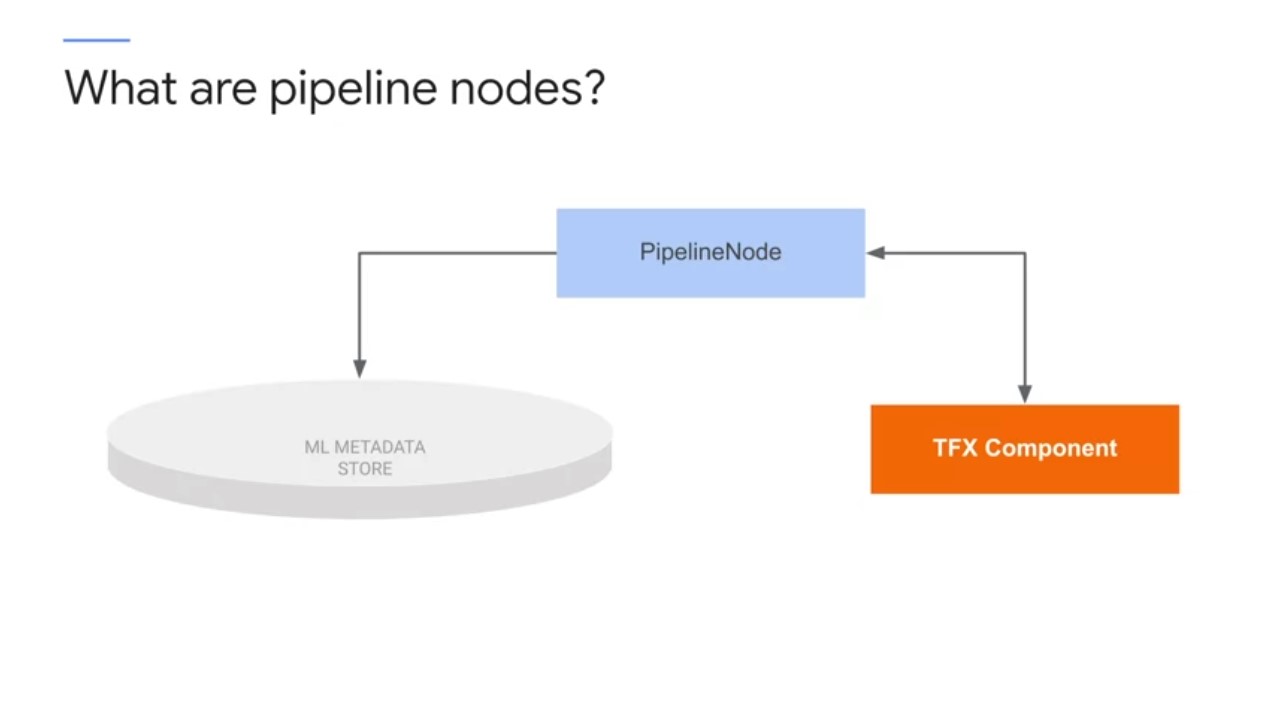 additional standardized part of the TFX pipeline to be aware of,
pipeline nodes. Pipeline nodes are special purpose classes for
performing advanced metadata operations, such as importing external
artifacts into ML metadata, performing queries of current ML metadata
based on artifacts properties and their history.
additional standardized part of the TFX pipeline to be aware of,
pipeline nodes. Pipeline nodes are special purpose classes for
performing advanced metadata operations, such as importing external
artifacts into ML metadata, performing queries of current ML metadata
based on artifacts properties and their history.
Importer Node
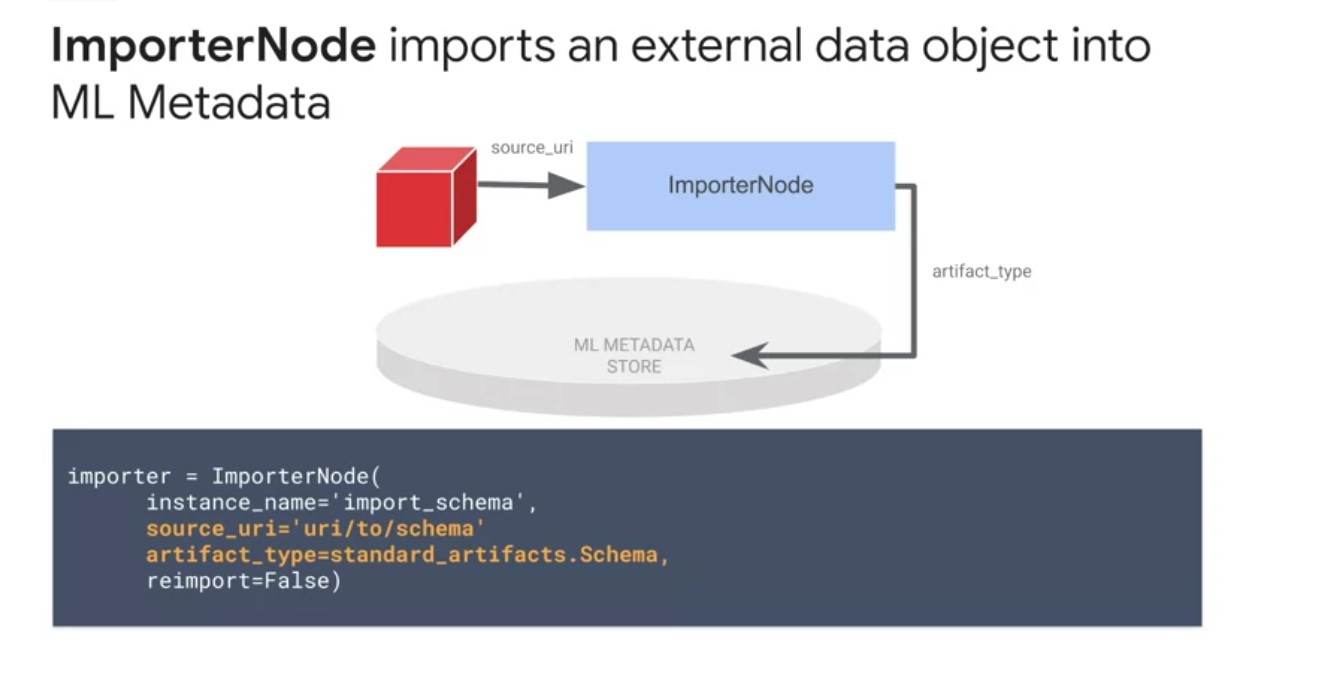
The most common pipeline node is the importer node, which is a specialty effects node that registers an external resource into the ML metadata library, so downstream nodes can use the registered artifact as input. The primary use case for this node is to bring in external artifacts like a schema into the TFX pipeline for use by the transform in trainer components. The schema Gen component can generate a schema based on inferring properties about your data on your first pipeline run. However, you will adapt the schema to codify your expectations over time with additional constraints on the features. Instead of regenerating the schema for each pipeline run, you can use the importer node to bring a previously generated or updated schema into your pipeline.
Resolver Node
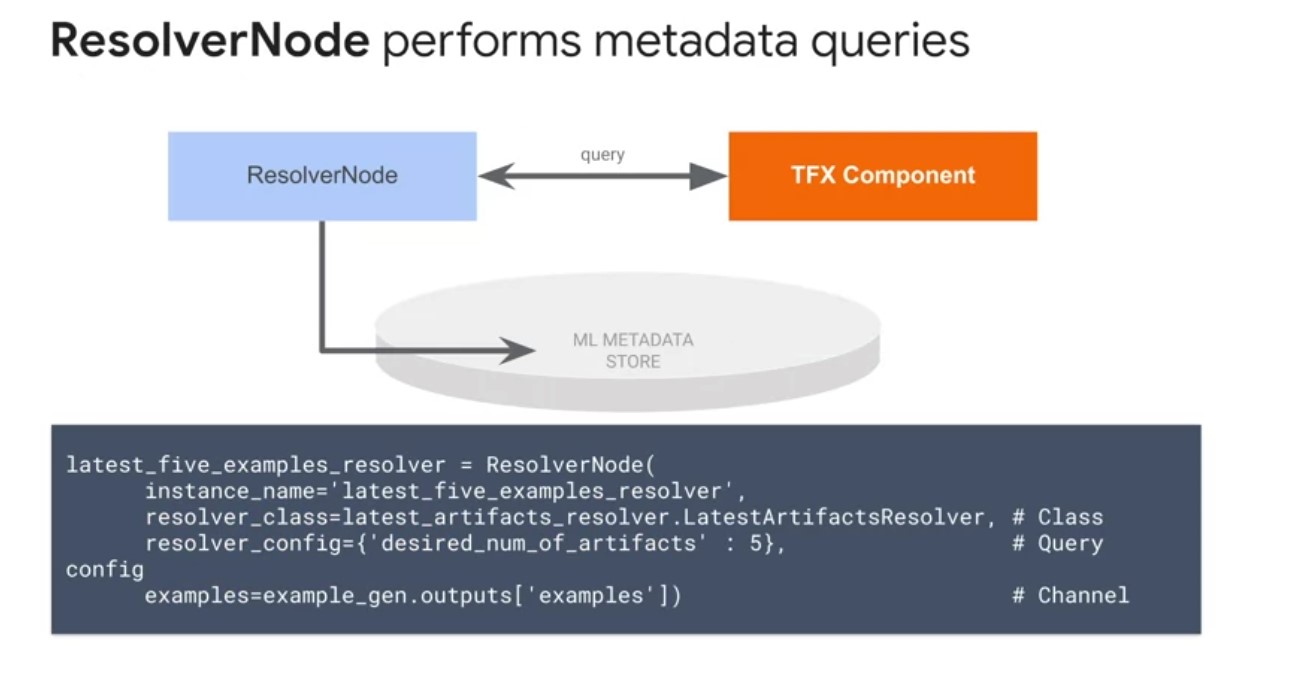
The next type of pipeline node is a resolver node. Resolver node is a special TFX node that handles special artifact resolution logistics that will be used as inputs for downstream nodes. The model resolver is only required if you are performing model validation in addition to evaluation. In the case above, we validate against the latest blessed model. If no model has been blessed before, the evaluator will make the current candidate model the first blessed model.
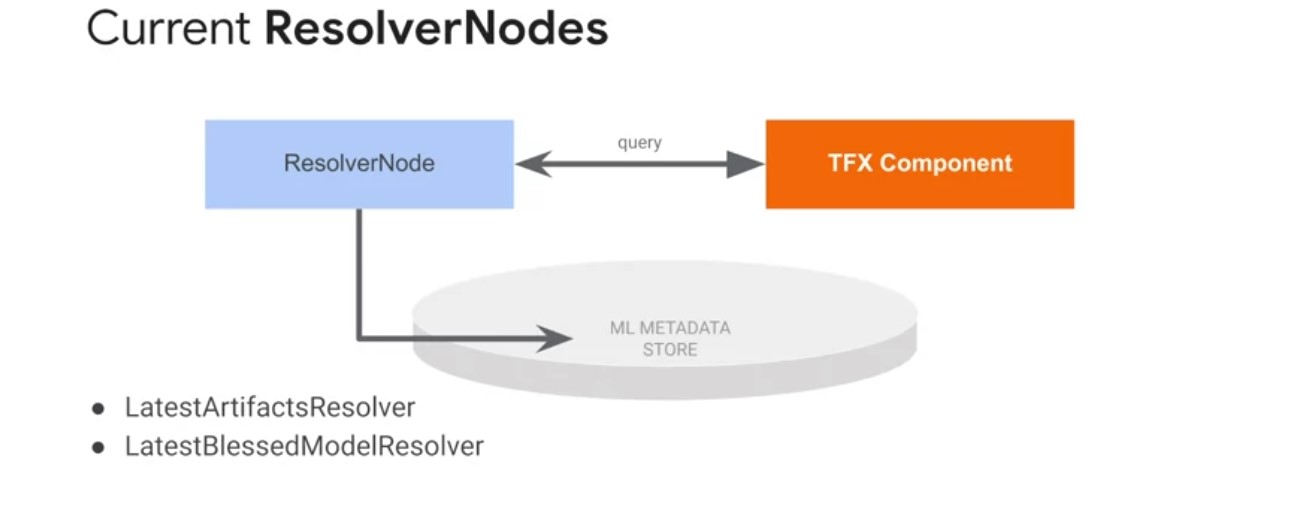
Latest artifact resolverreturns the latest artifacts in a given channel.- This helps in comparing multiple run artifacts, such as those generated by the evaluation component.
Latest blessed model resolverreturns the latest validated and blessed model.- This is useful for retrieving the best-performing model for exporting outside of the pipeline for one-off evaluation or inference
TFX Libraries
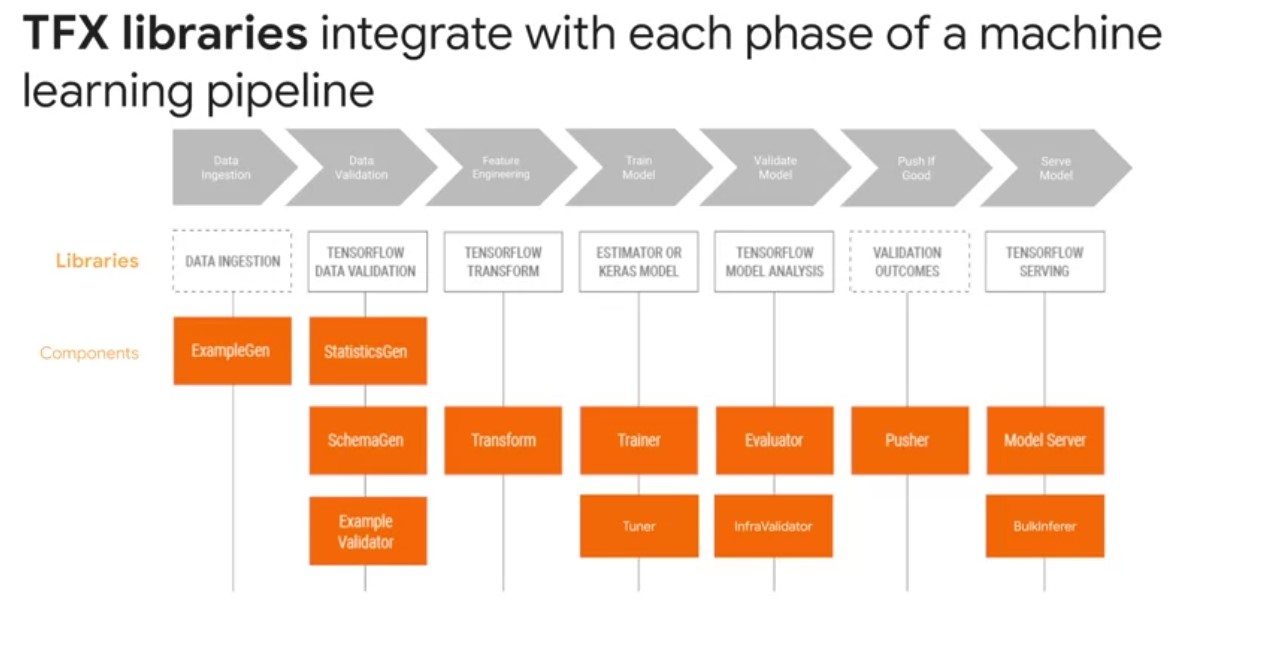
- TFX component executors use several shared libraries to perform the actual component computation.
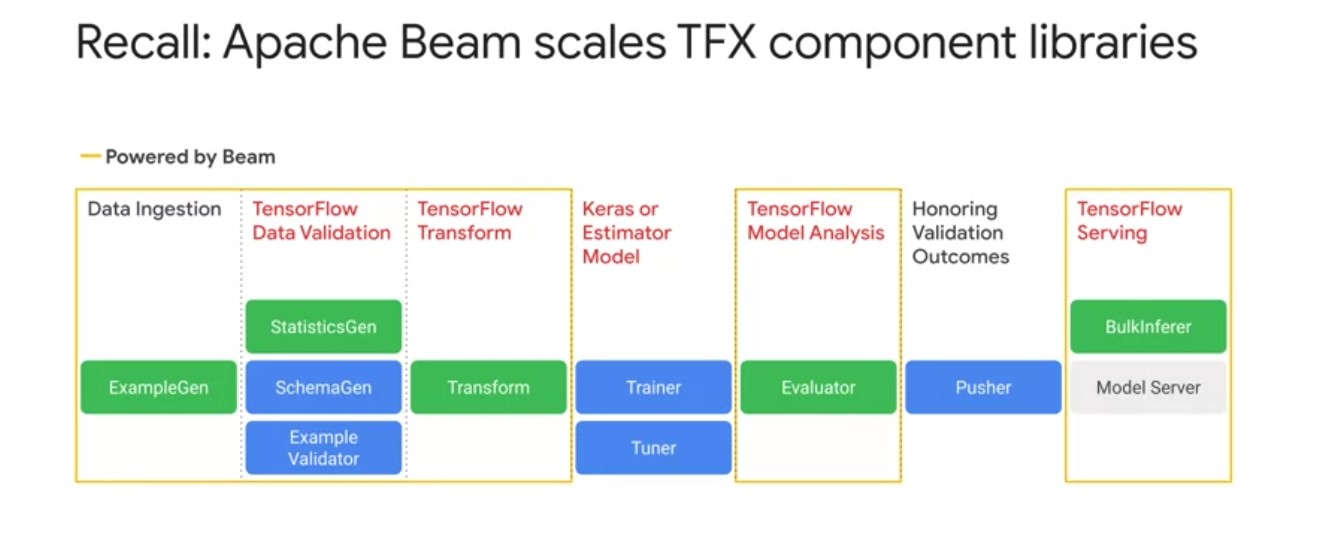
- TFX components are underpinned by shared libraries in the TensorFlow Ecosystem for data analysis and validation, as well as model training and evaluation.
- The diagram shows the relationships between TFX libraries and pipeline components.
TensorFlow Data Validation
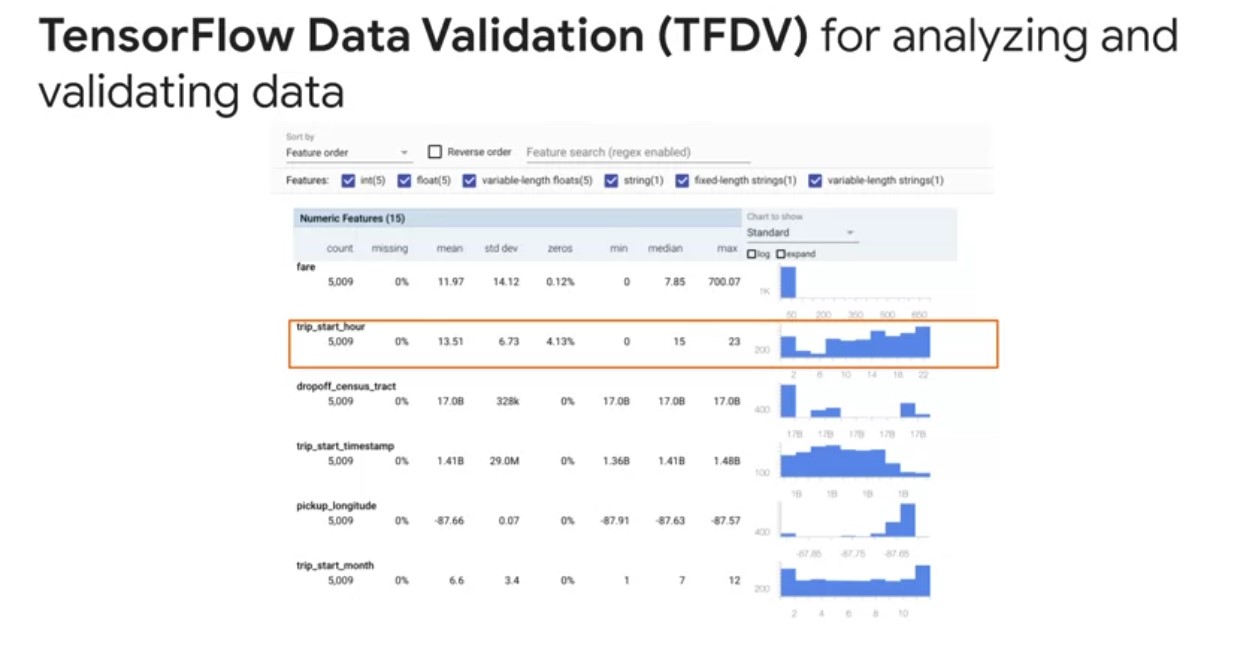
- TensorFlow Data Validation helps understand, validate, and monitor ML data at scale.
- Summary statistics enable monitoring feature distributions.
- TensorFlow Data Validation includes:
- Scalable calculations of summary statistics of training and test data,
- Integration with a viewer for data distributions and statistics,
- and faceted comparison of pairs of datasets using the facets library.
- Automated data schema generation to describe expectations about data such as required values, ranges, and vocabularies,
- A schema viewer to inspect the schema,
- Anomaly detection to identify anomalies such as missing features, out of range values, or wrong feature types.
TensorFlow Transform
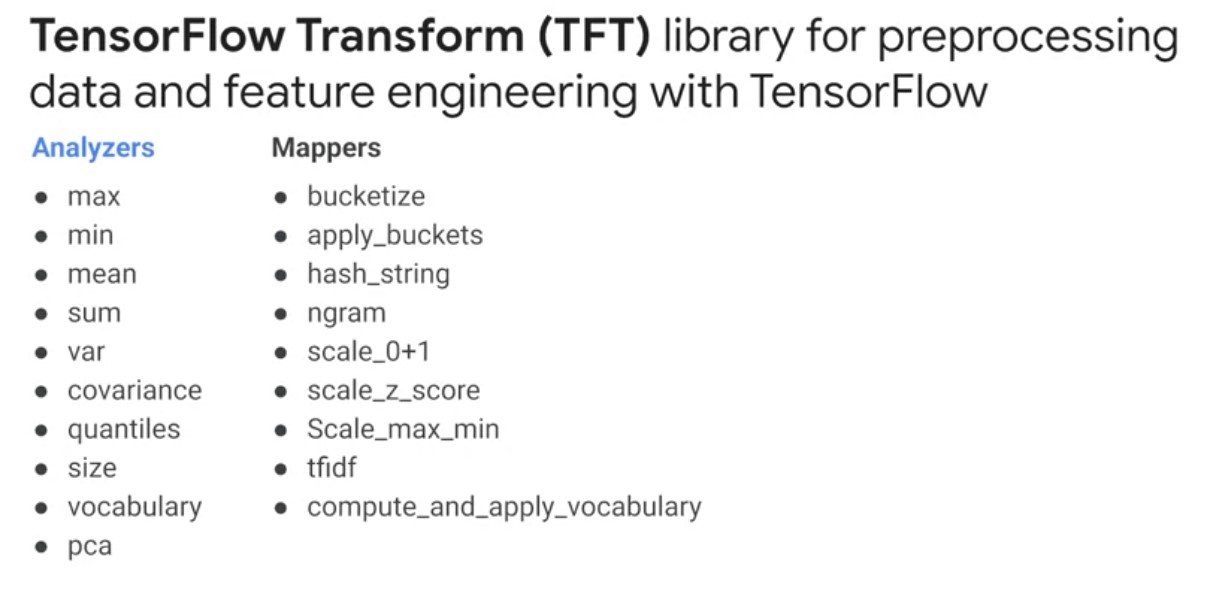
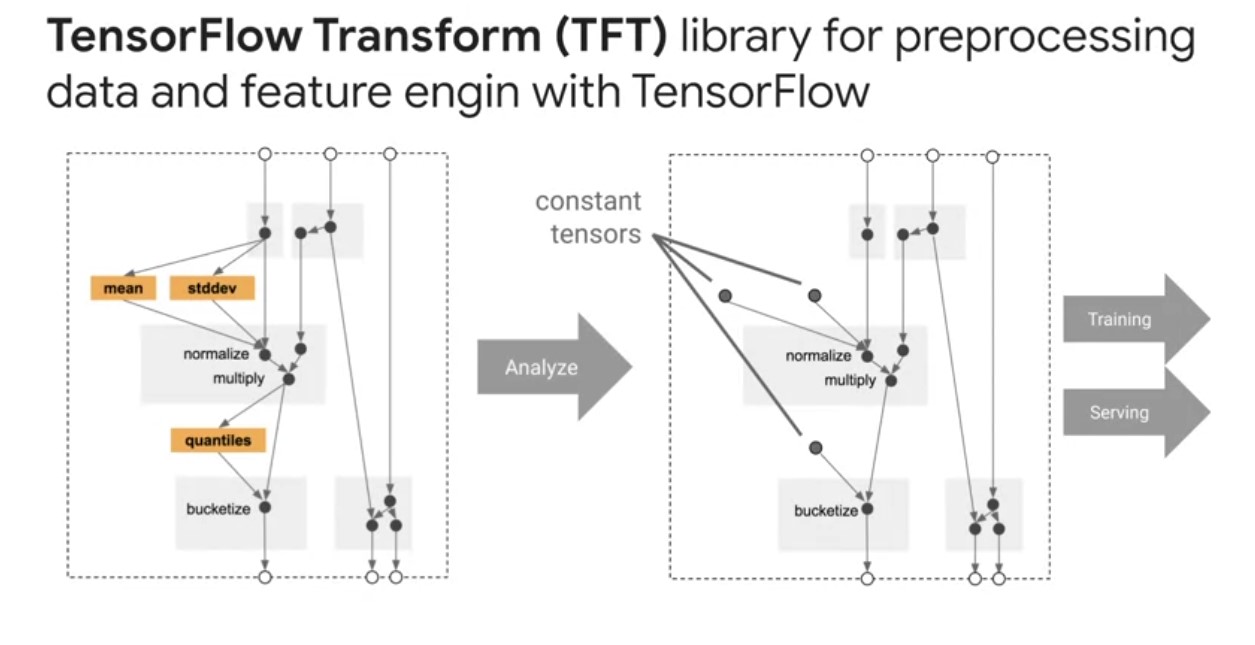
TensorFlow Transform is a library for pre-processing data and performing feature engineering with TensorFlow. It is useful for doing distributed compute using an Apache Beam on intensive data transformations, especially those that require a full dataset pass. This might include, feature normalization, so computing the mean and standard deviation on the entire training set could also include generating vocabularies overall input values to compare it to string data to numeric representations. It could also involve converting unbounded float features to integer features by assigning them to buckets based on the observed training data distribution. In addition to providing scalable full-pass dataset transformations, TF Transform encodes ML best practices on feature engineering directly into your TensorFlow graph for pre-processing input data consistently for model training and serving. The same code that is transforming your raw data at training and serving time is also doing so at serving time to reduce train serving skew, which can negatively impact your model performance.
TensorFlow
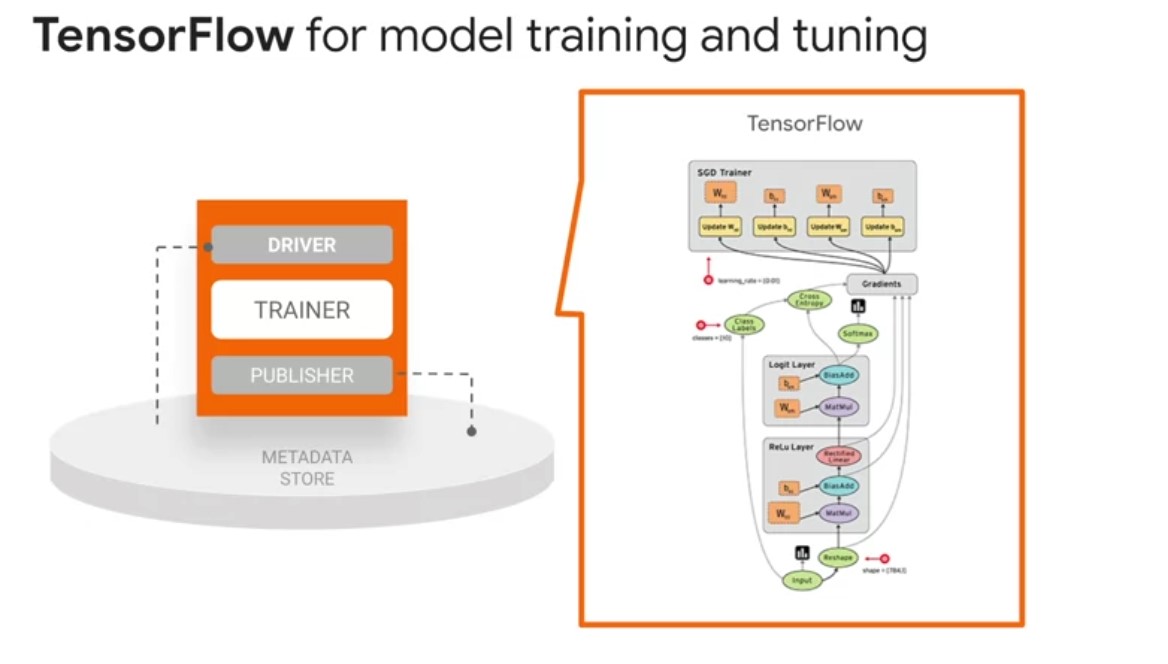
TensorFlow is used for training models with TFX. It ingests training data and modeling code and creates a SavedModel result. It also integrates a feature engineering pipeline created by a TensorFlow Transform for pre-processing input data. TFX supports nearly all of TensorFlow 2, with minor exceptions. TFX also fully supports TensorFlow 1.15 for backwards compatibility. New TFX pipelines can use TensorFlow 2 with Keras models view that generic trainer. TensorBoard provides the visualization and tooling needed for machine learning experimentation, such as, tracking and visualizing metrics, such as loss in accuracy, visualizing the model graph, including operations and layers, viewing histograms of weight biases and other tensors as they change over time, projecting embeddings to a lower-dimensional space, displaying images, text and audio data, profiling in TensorFlow programs, and certainly much more via open-source extensions that are being added by the TensorFlow community.
TensorBoard
TensorBoard is integrated directly into TFX. During prototyping in a Jupyter Notebook, you can launch TensorBoard as a widget embedded in the notebook or as small web server from the command line to read from your pipelines log directory. You can also use tensorboard.dev, which is a new service that lets you easily host, track, and share your experiment results.
TensorFlow Model Analysis
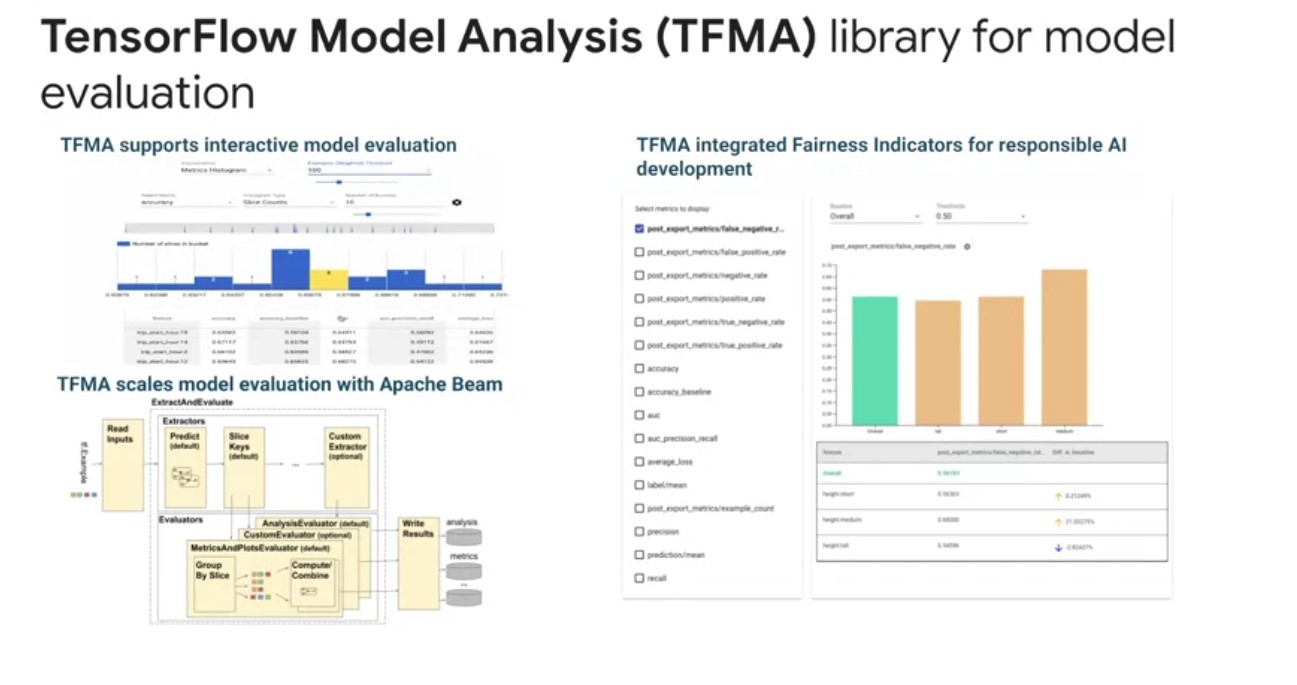
TensorFlow model analysis enables developers to compute and visualize evaluation metrics for their models. Before deploying any machine learning model, machine learning developers need to evaluate model performance to ensure that it meets specific quality thresholds and behaves as expected for all relevant slices of data. TensorFlow model analysis gives developers the tools to create a deep understanding of there model performance. On the left is a picture of visualizing TFMA’s model performance slices for interactive model performance evaluation. Below that is a detailed view about TFMA uses Apache Beam to scale model evaluation with your data, and adjust TF examples, and it has a series of Beam instructors and evaluators that compute metric slices and group combinations using a variety of transforms. TFMA can also incorporate the Fairness Indicators library, which enables easy computation of commonly identified fair in this metrics for binary multi-class classifiers. With the fairness Indicators tool suite, you can compute commonly identified fairness metrics for classification levels, compare model performance across subgroups to a baseline or to other models, use confidence intervals to surface statistically significant disparities.
TFMA Vs TensorBoard
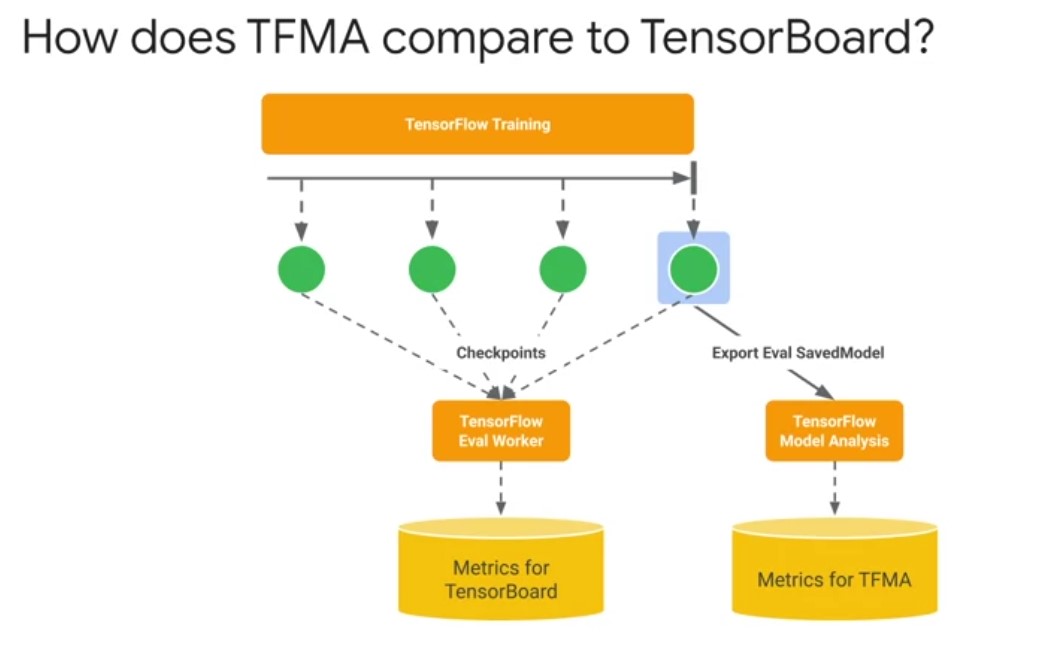
why do I need TensorBoard and TFMA for model evaluation? TensorBoard visualizes streaming whole model metrics that are computed from checkpoints during training. On the other hand, TFMA computes and visualizes metrics using an exported eval saved model format in batch to give you a much deeper granularity on your model’s performance across slices.
Week 2
TFX Orchestrators
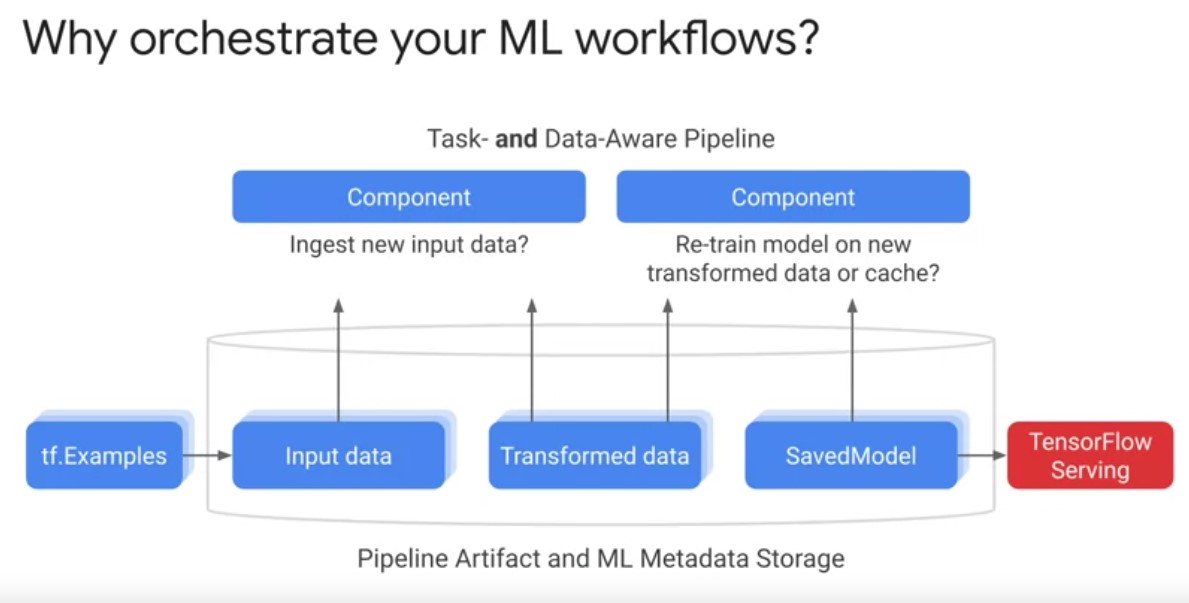
TFX orchestrators are responsible for scheduling TFX pipeline components, sequentially based on a directed graph of artifact dependencies. Let’s dive into learn more. First, it is necessary to revisit the motivation for orchestrating TFX pipelines. Why orchestrate your ML workflows? Play video starting at ::27 and follow transcript0:27 Orchestration is about bringing standardization and software engineering best practices to machine learning workflows, so you can spend more time focusing on solving your machine learning problem. And have the details of your computing environment abstracted away by not adopting standardized machine learning pipelines. Data Science and machine learning engineering teams will face unique project setups, arbitrary log file locations, unique debugging steps that quickly accumulate costly technical debt. Play video starting at ::58 and follow transcript0:58 Standardizing your machine learning pipelines, project setups with versioning, logging and monitoring, enables code sharing and reuse. And allows your pipeline to portably run across multiple environments. Production machine learning ultimately it’s a team sport. Standardization allows machine learning teams to more easily collaborate. Play video starting at :1:20 and follow transcript1:20 Experienced team members can focus on the problem you’re applying machine learning to, while having the tools to manage and monitor their pipelines. Play video starting at :1:30 and follow transcript1:30 New team members familiar with TFX pipelines and components also have an easier time ramping up on projects and making effective contributions. Play video starting at :1:39 and follow transcript1:39 Orchestrating machine learning workflows in a standardized way, is a key technique that Google has applied to industrialized machine learning across alphabet.
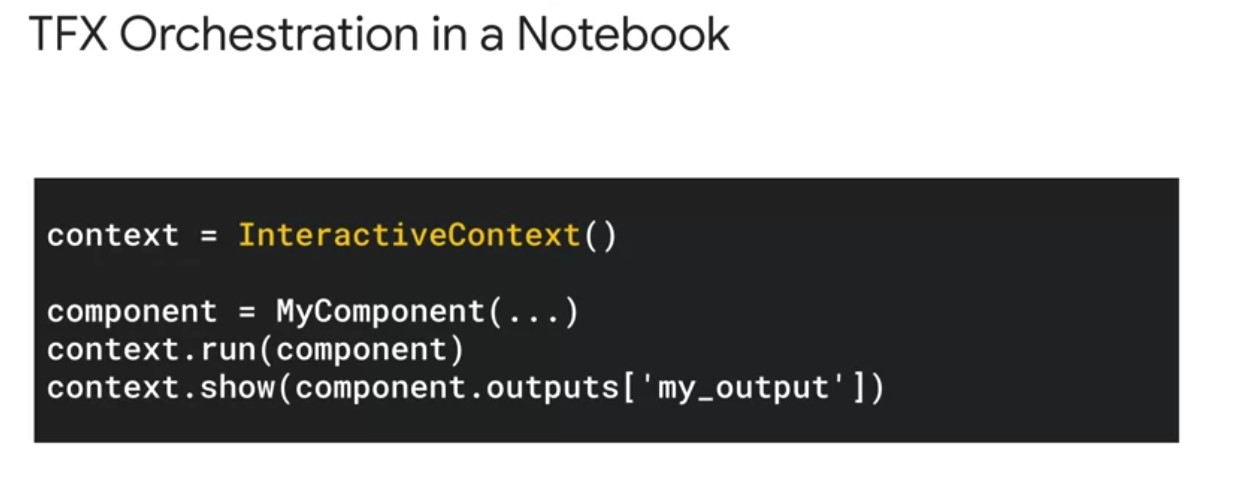
In the TFX pipeline development workflow, experimentation typically begins in a Jupyter Notebook. You can build your pipeline iteratively using an interactive context object, as shown to handle component execution and artifact visualization in embedded HTML windows within the notebook. The interactive context object also sets up a symbol in memory, ML metadata store using SQL lite and automatically stores and organized pipeline artefacts on the local file system. Using the interactive context export to pipeline method, you can also export your local TFX pipeline to a production ready orchestrators such as Apache Beam with minimal code changes. Play video starting at :2:35 and follow transcript2:35 Although notebooks are great for experimentation and interactive execution, they do not have a level of automation for continuous training and computation necessary for production machine learning.
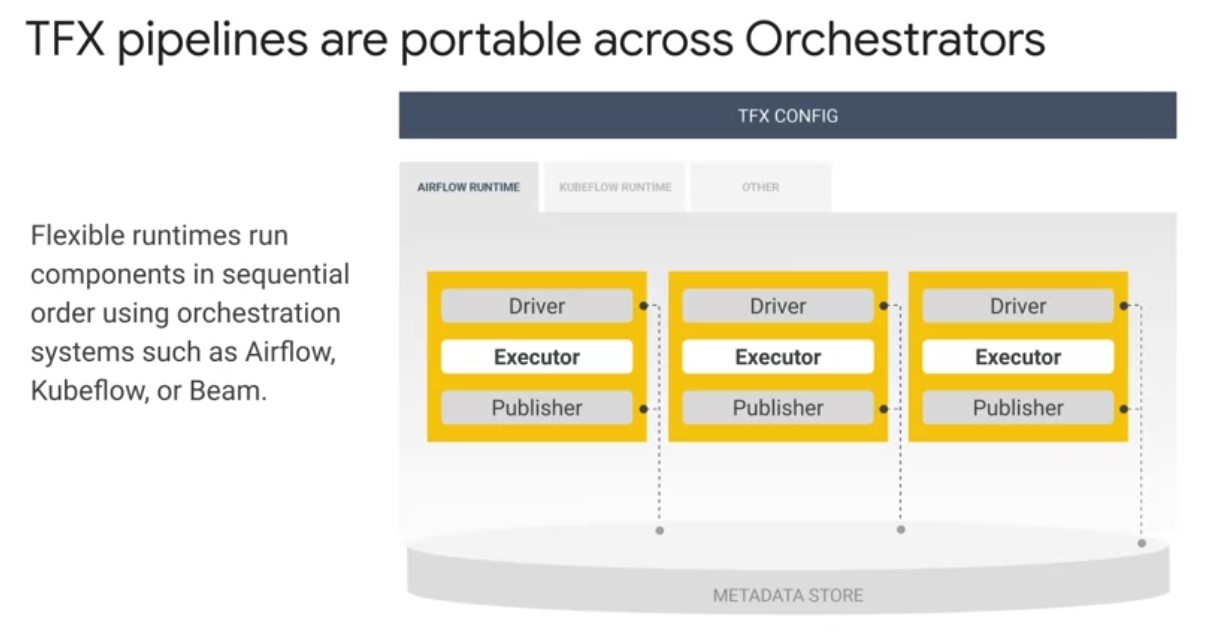
Different orchestrators are needed to serve as an obstruction that seats over the computing environment that supports your pipeline scaling with your data. Play video starting at :3: and follow transcript3:00 For production, TFX pipelines are portable across orchestrators, which means you can run your pipeline on premise or on a cloud provider such as Google Cloud.
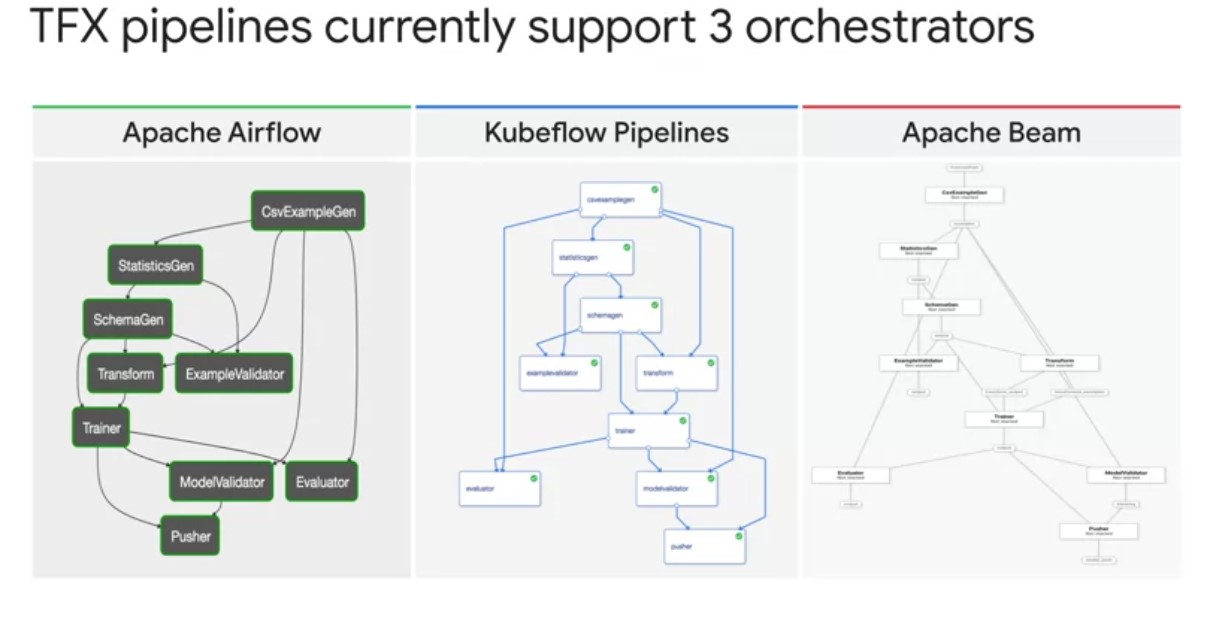
TFX supports orchestrators such as apache airflow, kubeflow pipelines and apache beam. TFX uses the term DAG Runner to refer to an implementation that supports an orchestrator. Play video starting at :3:27 and follow transcript3:27 Notice that no matter which orchestrator you choose, TFX produces the same standardized pipeline directed a cyclical graph. Let’s examine each one of these orchestrators individually and the use cases for each. Play video starting at :3:44 and follow transcript3:44
TFX Apache Beam Orchestrator
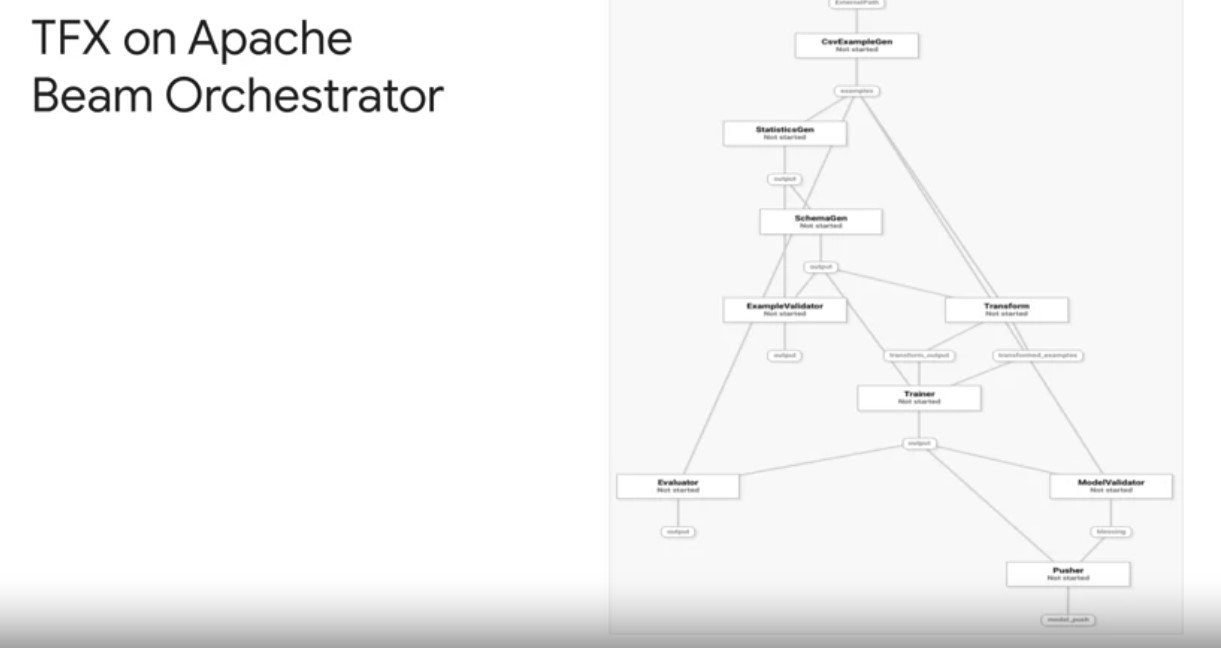
First, TFX can use Apache Beam direct runner to orchestrate and execute the pipeline DAg. The beam direct runner can be used for local debugging without incurring the extra airflow or kubeflow dependencies which simplifies system configuration and pipeline debugging. Play video starting at :4:3 and follow transcript4:03 In fact, using the beam direct runner is a great option for extending TFX notebook based prototyping. Play video starting at :4:10 and follow transcript4:10 You can package your pipeline defined in a notebook into a pipeline.py file using the interactive context export to pipeline method. You can then execute that file locally using the direct runner to debug and validate your pipeline before scaling your pipelines, data processing an a production orchestrator on Google Cloud. When your pipeline works, you can then run your pipeline using the beam runner on a distributed compute environment, such as the cloud to scale your pipeline data processing up to your production needs.
TFX KubeFlow Orchestrator
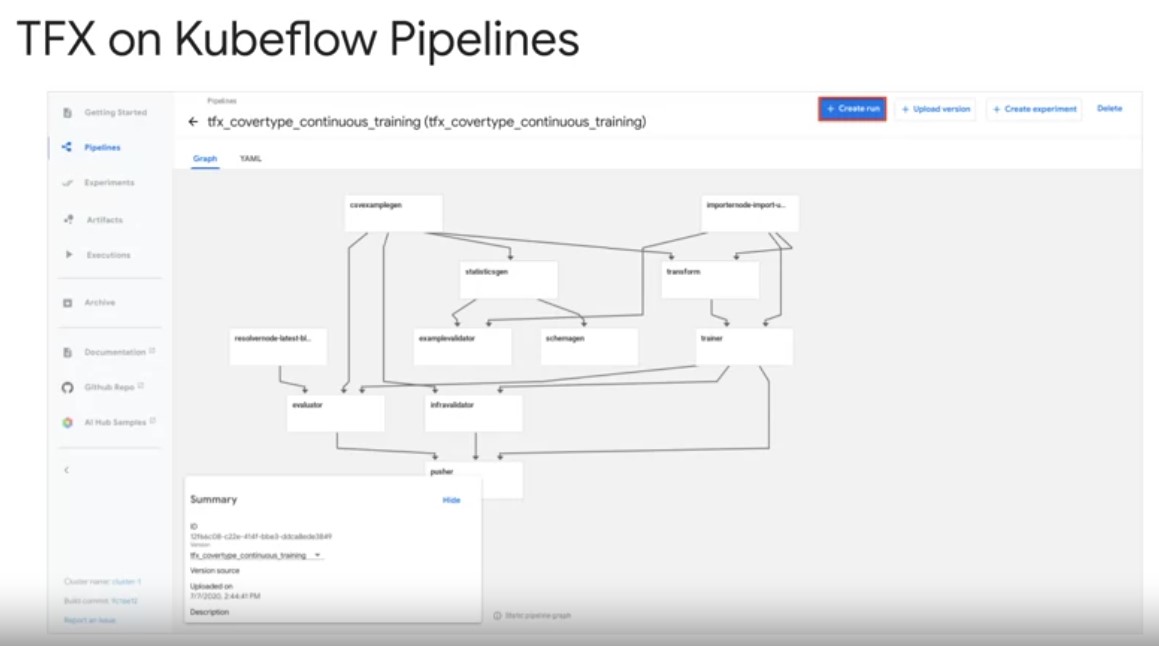
Second, TFX pipelines run on top of the kubeflow pipelines orchestrator on Google Cloud for hosted and managed pipelines. Kubeflow is an open source machine learning platform, dedicated to making deployments of machine learning workflows on Kubernetes, simple, portable and scalable. Play video starting at :5:4 and follow transcript5:04 Kubeflow pipelines services on Kubernetes include the hosted ML metadata store container based orchestration engine, notebook server. And UI to help users develop, run and manage complex machine learning pipelines at scale, including TFX. Play video starting at :5:21 and follow transcript5:21 From the UI you can create or connect to an easily scalable Kubernetes cluster for your pipelines, compute and storage. In KFP also allows you to take care of service account setup for secure access to Google Cloud services, like cloud storage for artifact storage and BigQuery for data processing.
TFX Airflow Orchestrator
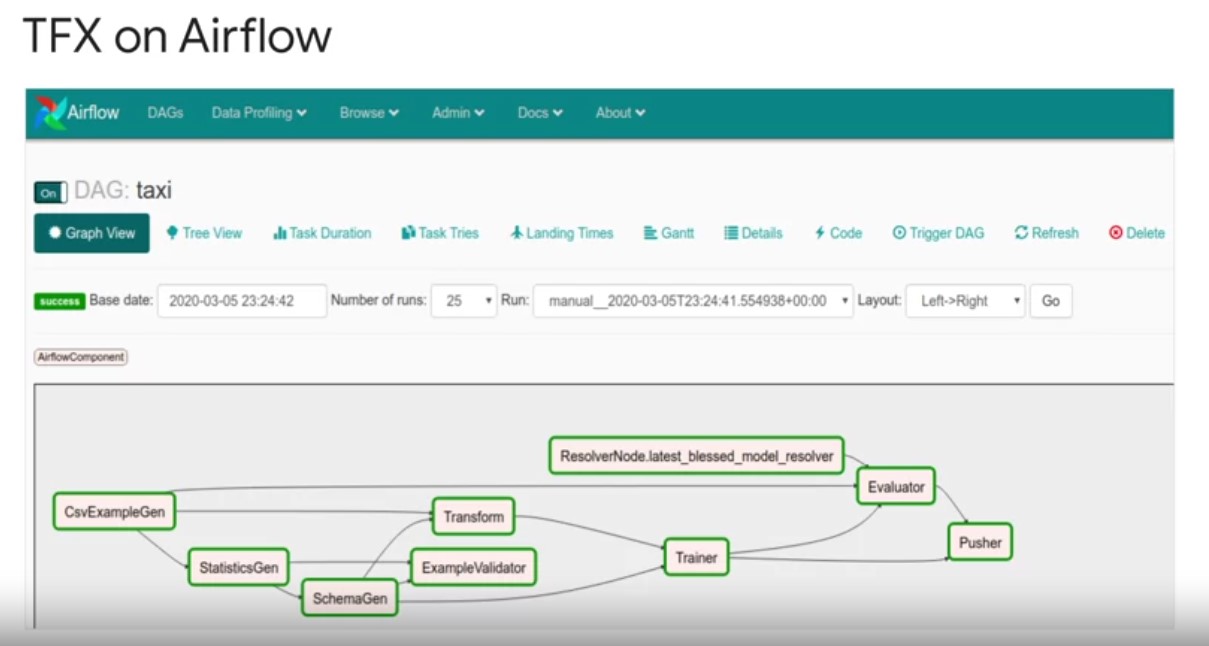
- TFX pipelines can be orchestrated by Apache airflow, the chair
platform to programmatically author schedule and monitor your workflows. Play video starting at :5:51 and follow transcript5:51 Google Cloud has a fully managed version of airflow called composer that tightly integrates with other services that can power TFX including BigQuery and data flow. Play video starting at :6:2 and follow transcript6:02 The airflow scheduler executes tasks on an array of workers while following the specified dependencies. Play video starting at :6:10 and follow transcript6:10 Rich command line utilities may complex graph construction and update operations on TFX pipeline DAGs easily accessible. Play video starting at :6:19 and follow transcript6:19 The UI allows you to visualize TFX pipelines running in production, monitoring job progress, and troubleshooting issues when needed. Play video starting at :6:29 and follow transcript6:29 Airflow is the more mature orchestrator for TFX with the flexibility to run your pipeline, along with pre pipeline data processing pipelines, and post pipeline model deployment in model prediction logic. Put another way airflow is a more general orchestrator for the entirety of your machine learning system.
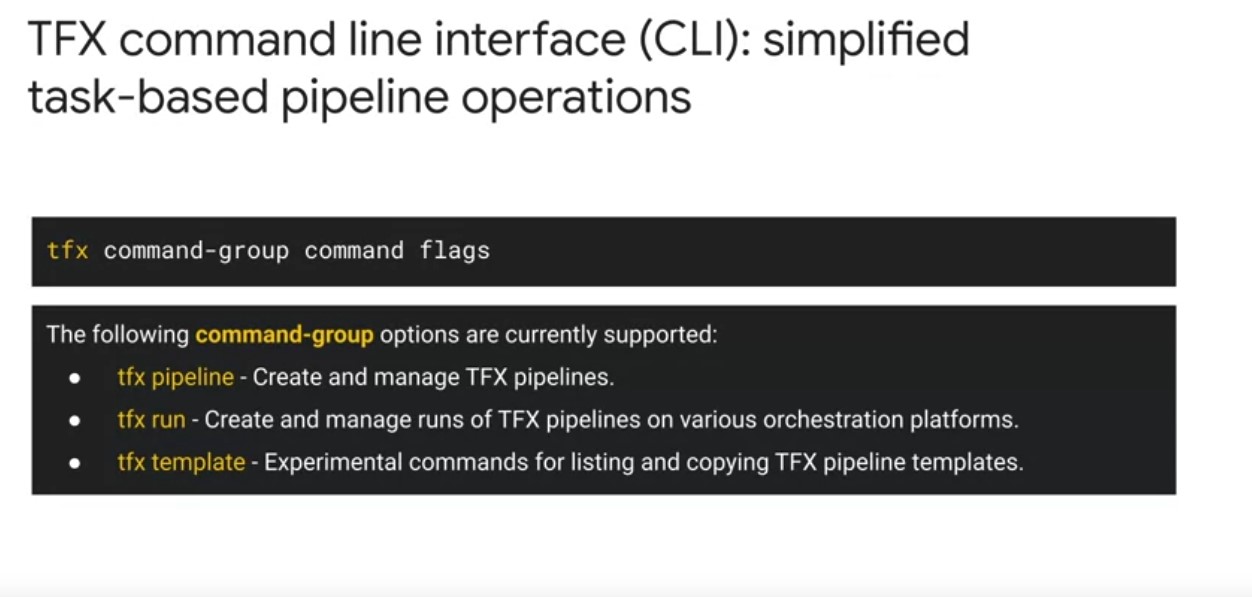
TFX Command Line Interface
- TFX CLI supports manual manual pipeline orchestration tests.
- Performs a full range of pipeline actions using pipeline orchestrators such as airflow, beam, and kubeflow pipelines.
tfx pipelinecan be used to create, update, and delete pipelines.tfx runcan be used to run a pipeline and monitor the run on various orchestratorstfx template:to copy over template pipelines to modify and launch in order to accelerate pipeline development.
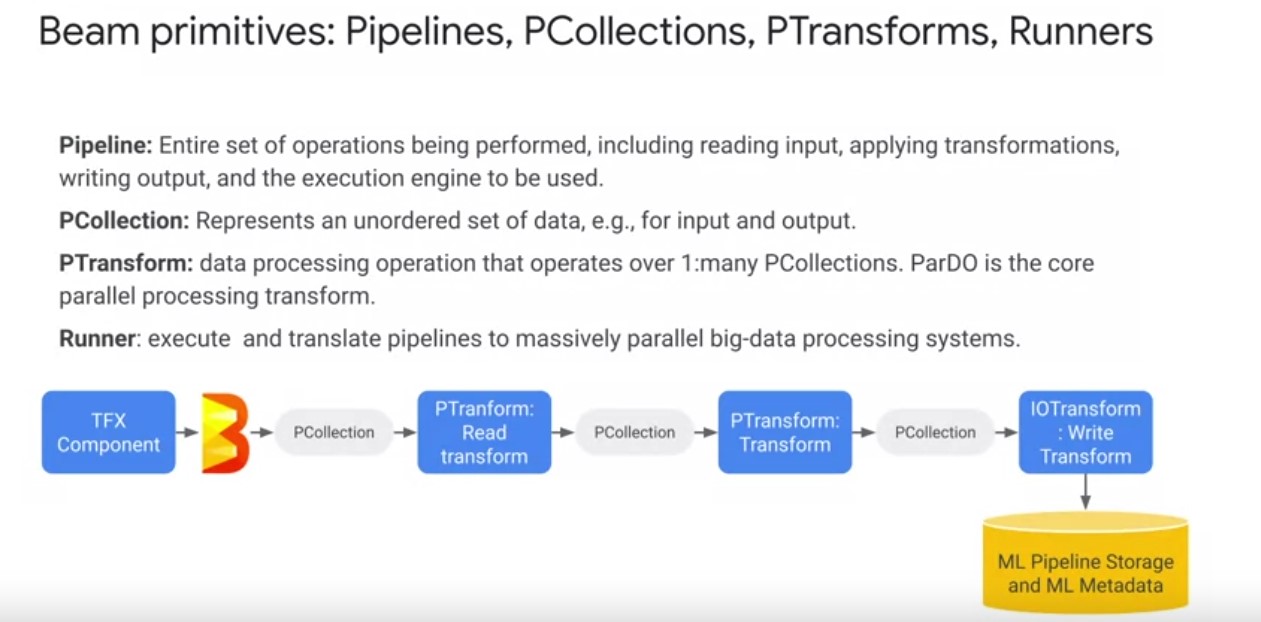
Apache Beam
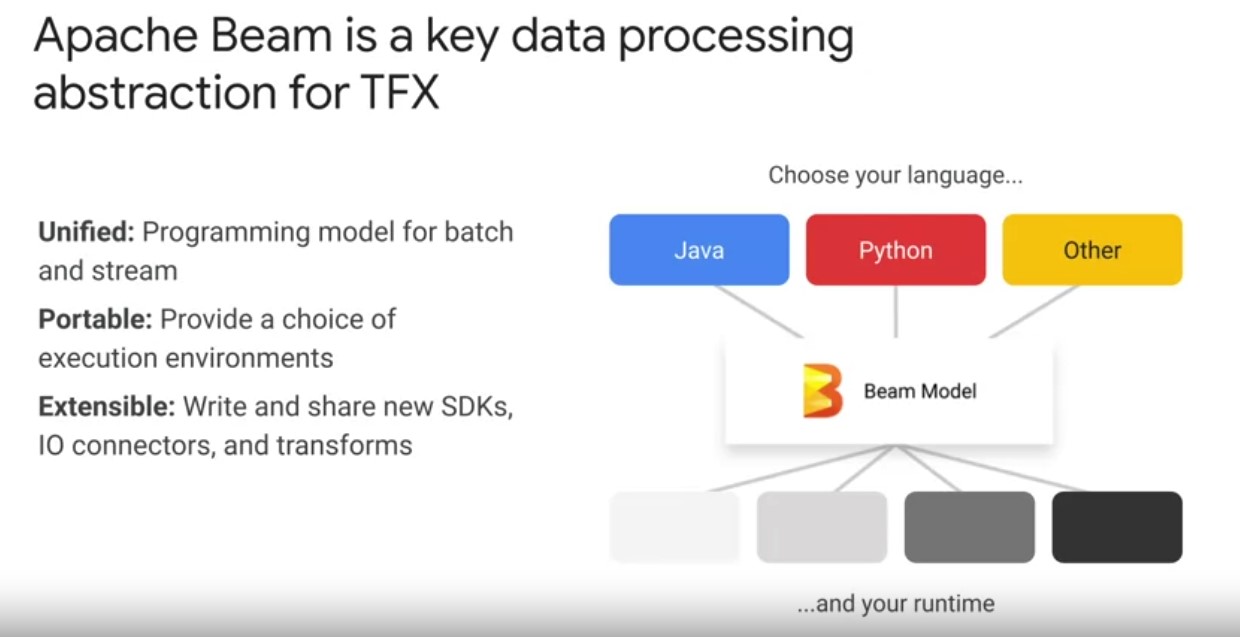
- Beam is an abstraction that provides incredible flexibility and unification of batch and stream data processing that underpins TFX pipelines.
- Beam helps to write code once, and not worry about scaling data processing again.
- Beam includes support for a variety of execution engines or runners, including a direct runner that runs on a single compute node.
TFX On Google Cloud
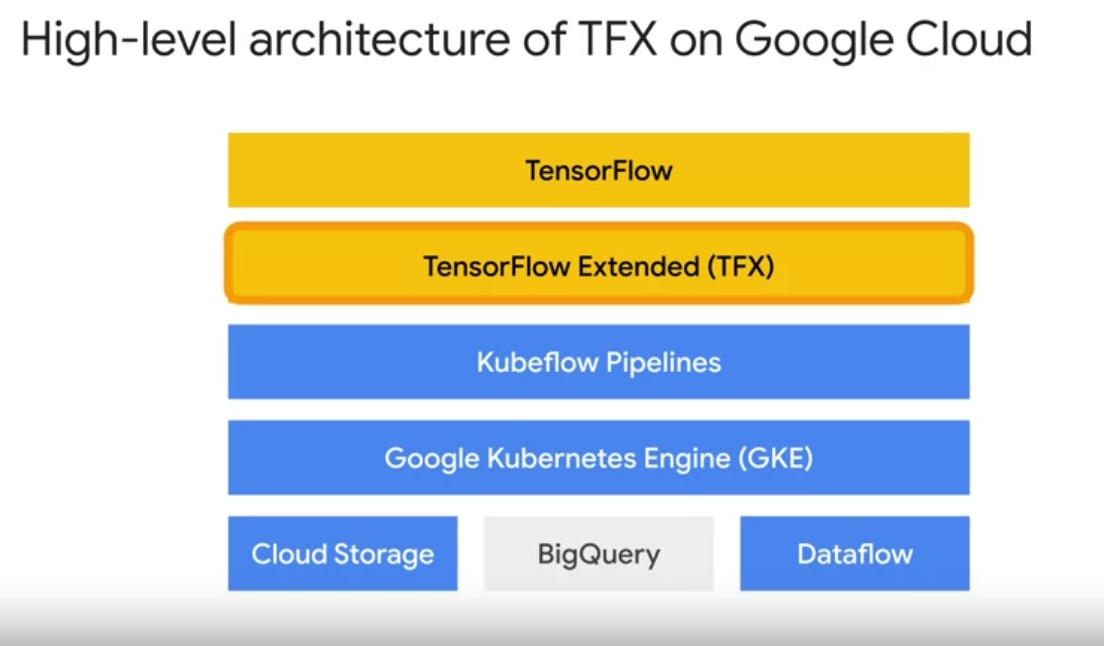 TFX sits on top of several layers of abstraction on Google Cloud to
simplify running your tensor flow modeling code and production. Play
video starting at ::37 and follow transcript0:37 On Google Cloud, TFX
runs on top of an AI platform Kubeflow pipelines instance. Which in
turn runs on top of a Kubernete’s cluster. Play video starting at
::46 and follow transcript0:46 This instance simplifies the setup of a
Kubernetes compute cluster, which coordinates the execution of your
actual pipeline jobs. As well as hosts ml metadata in its persistent
storage. Play video starting at ::59 and follow transcript0:59
Pipeline artifacts storage is handled by cloud storage. As shown in
your notebook lab, TFX simplifies standardized pipelined directory
management for artifacts and metadata on local file system. TFX’s
capabilities can also be further extended to do so on Cloud storage,
or remote globally distributed and scalable file system. Play video
starting at :1:21 and follow transcript1:21 You can also directly use
BigQuery Google Clouds data warehousing solution as a data source.
Play video starting at :1:29 and follow transcript1:29 Further
underpinning your TFX pipelines data processing is Apache beam jobs
executed using the manage data flow product.
TFX sits on top of several layers of abstraction on Google Cloud to
simplify running your tensor flow modeling code and production. Play
video starting at ::37 and follow transcript0:37 On Google Cloud, TFX
runs on top of an AI platform Kubeflow pipelines instance. Which in
turn runs on top of a Kubernete’s cluster. Play video starting at
::46 and follow transcript0:46 This instance simplifies the setup of a
Kubernetes compute cluster, which coordinates the execution of your
actual pipeline jobs. As well as hosts ml metadata in its persistent
storage. Play video starting at ::59 and follow transcript0:59
Pipeline artifacts storage is handled by cloud storage. As shown in
your notebook lab, TFX simplifies standardized pipelined directory
management for artifacts and metadata on local file system. TFX’s
capabilities can also be further extended to do so on Cloud storage,
or remote globally distributed and scalable file system. Play video
starting at :1:21 and follow transcript1:21 You can also directly use
BigQuery Google Clouds data warehousing solution as a data source.
Play video starting at :1:29 and follow transcript1:29 Further
underpinning your TFX pipelines data processing is Apache beam jobs
executed using the manage data flow product.
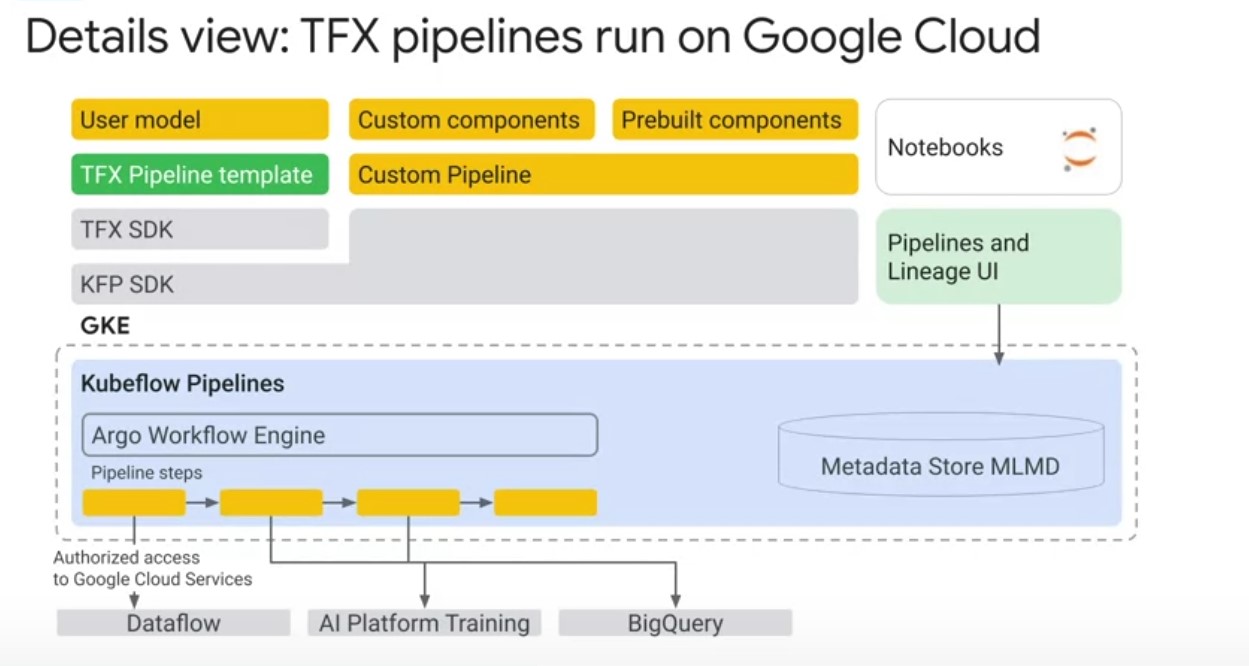 Let’s go one layer deeper to see how TFX runs on Google Cloud. First,
the TFX domain specific language for pipeline authoring takes a user
defined pipeline in a pipeline dot Pi file. That includes a mix of
standard and custom components. Play video starting at :1:54 and
follow transcript1:54 Second, the TFX pipeline software development
kit translates your pipeline description. Into a Kubeflow pipeline EMO
file that can be executed with a Kubeflow dag runner. Play video
starting at :2:6 and follow transcript2:06 Third, your TFX pipeline is
now a Kubeflow pipeline, that is run on a google Kubernetes engine
cluster. The Argo workflow engine coordinates, your pipelines
components. And your pipeline ml metadata is stored on a persistent
disk on your Google Kubernetes Engine instance. Play video starting
at :2:25 and follow transcript2:25 Depending on your pipeline runtime
setting, your pipeline also enjoy secure access to underlying Google
Cloud services.
Let’s go one layer deeper to see how TFX runs on Google Cloud. First,
the TFX domain specific language for pipeline authoring takes a user
defined pipeline in a pipeline dot Pi file. That includes a mix of
standard and custom components. Play video starting at :1:54 and
follow transcript1:54 Second, the TFX pipeline software development
kit translates your pipeline description. Into a Kubeflow pipeline EMO
file that can be executed with a Kubeflow dag runner. Play video
starting at :2:6 and follow transcript2:06 Third, your TFX pipeline is
now a Kubeflow pipeline, that is run on a google Kubernetes engine
cluster. The Argo workflow engine coordinates, your pipelines
components. And your pipeline ml metadata is stored on a persistent
disk on your Google Kubernetes Engine instance. Play video starting
at :2:25 and follow transcript2:25 Depending on your pipeline runtime
setting, your pipeline also enjoy secure access to underlying Google
Cloud services.
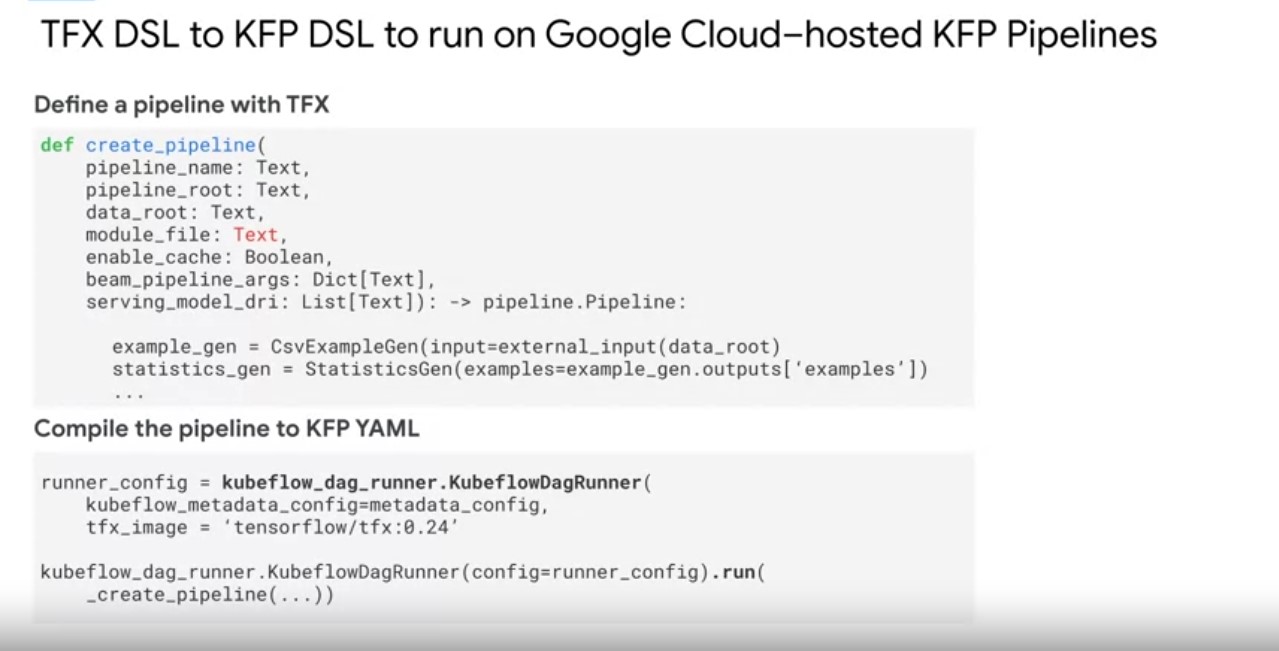 The key takeaway for running pipelines on top of Google Cloud, is that
the TFX DSL is converting your TFX pipeline code. Into a Kubeflow
pipeline through the Kubeflow pipelines DSL. It is simplifying the
operation of running on Google Cloud. Again, enabling you to keep
focused on your machine learning problem and delivering business
impact.
The key takeaway for running pipelines on top of Google Cloud, is that
the TFX DSL is converting your TFX pipeline code. Into a Kubeflow
pipeline through the Kubeflow pipelines DSL. It is simplifying the
operation of running on Google Cloud. Again, enabling you to keep
focused on your machine learning problem and delivering business
impact.
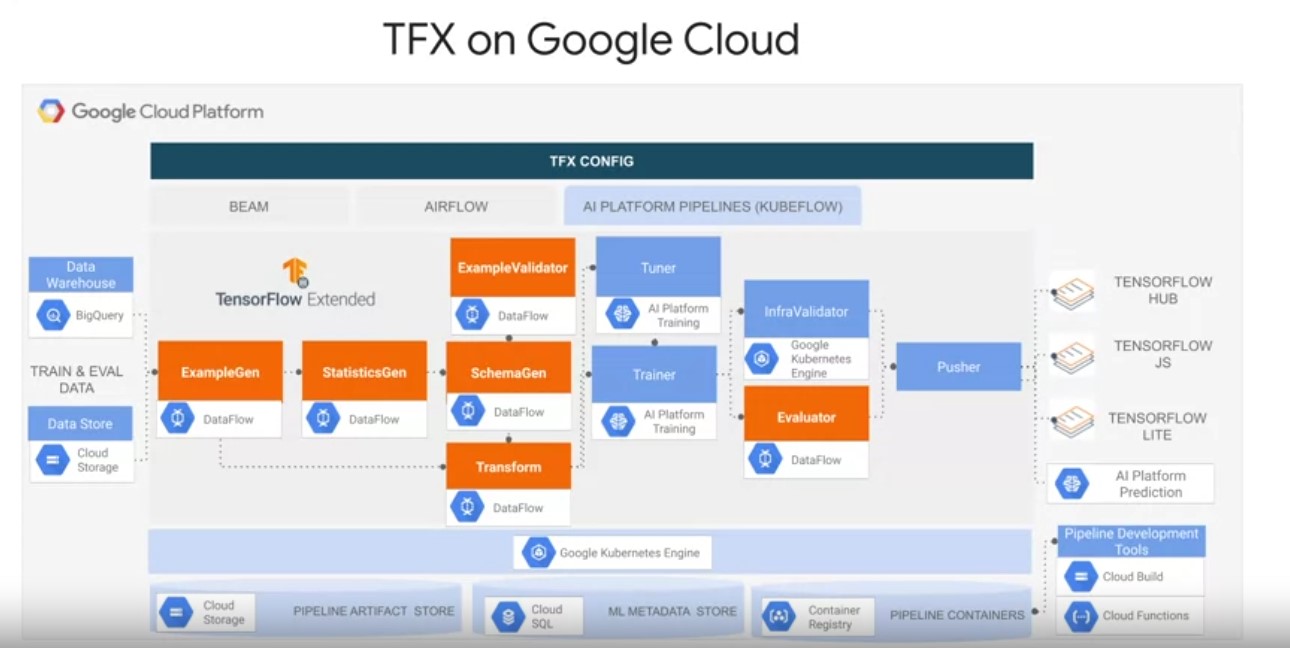 TFX supports
tight integrations with many Google Cloud services, and runs on top of
cloud AI platform pipelines. Play video starting at :3:6 and follow
transcript3:06 For standard data and model components that use Apache
Beam to implement data parallel pipelines. Google Cloud Dataflow
manages the distribution of component executed data processing
workflows. Under the TFX extensions API, there’s also support for
using many Google Cloud Managed Services. To scale your machine
learning workflow with your data. These include, a custom ExampleGen
for data stored in BigQuery, Google Cloud’s data warehouse solution.
Play video starting at :3:38 and follow transcript3:38 The BigQuery
example gen component can take SQL queries as input to generate TF
record data splits to feed into your pipeline. Play video starting at
:3:47 and follow transcript3:47 The standard example Gen also supports
data ingestion for data stored on the Google storage file
system. Distributed using glob file patterns in a number of different
file formats. Play video starting at :4: and follow transcript4:00 A
custom trainer component for running TensorFlow jobs on cloud AI
platform training. A custom tuner component for distributing tuner
jobs on AI platform training Using the familiar cares tuner API’s.
Play video starting at :4:15 and follow transcript4:15 A custom pusher
component to push TFX models to Cloud AI platform prediction for a
managed, scalable production model server. Play video starting at
:4:24 and follow transcript4:24 Cloud AI platform runs on top of a
Google Kubernetes engine cluster. So, your TFX pipeline has
integrations to store pipeline artifacts on Cloud Storage. Operational
logs on cloud logging, and ML metadata on cloud SQL. Play video
starting at :4:40 and follow transcript4:40 This simplification of
pipeline artifact and metadata tracking allows you to accelerate your
TFX development, and experimentation velocity. Furthermore, Google
Cloud development tools like Cloud Functions, Container Registry, In
cloud build streamline TFX pipeline coaching. Testing, deployment, and
automatic triggering of continuous pipeline training. We will discuss
using these tools for TFX pipeline continuous integration and
deployment workflows on Google Cloud in the next module.
TFX supports
tight integrations with many Google Cloud services, and runs on top of
cloud AI platform pipelines. Play video starting at :3:6 and follow
transcript3:06 For standard data and model components that use Apache
Beam to implement data parallel pipelines. Google Cloud Dataflow
manages the distribution of component executed data processing
workflows. Under the TFX extensions API, there’s also support for
using many Google Cloud Managed Services. To scale your machine
learning workflow with your data. These include, a custom ExampleGen
for data stored in BigQuery, Google Cloud’s data warehouse solution.
Play video starting at :3:38 and follow transcript3:38 The BigQuery
example gen component can take SQL queries as input to generate TF
record data splits to feed into your pipeline. Play video starting at
:3:47 and follow transcript3:47 The standard example Gen also supports
data ingestion for data stored on the Google storage file
system. Distributed using glob file patterns in a number of different
file formats. Play video starting at :4: and follow transcript4:00 A
custom trainer component for running TensorFlow jobs on cloud AI
platform training. A custom tuner component for distributing tuner
jobs on AI platform training Using the familiar cares tuner API’s.
Play video starting at :4:15 and follow transcript4:15 A custom pusher
component to push TFX models to Cloud AI platform prediction for a
managed, scalable production model server. Play video starting at
:4:24 and follow transcript4:24 Cloud AI platform runs on top of a
Google Kubernetes engine cluster. So, your TFX pipeline has
integrations to store pipeline artifacts on Cloud Storage. Operational
logs on cloud logging, and ML metadata on cloud SQL. Play video
starting at :4:40 and follow transcript4:40 This simplification of
pipeline artifact and metadata tracking allows you to accelerate your
TFX development, and experimentation velocity. Furthermore, Google
Cloud development tools like Cloud Functions, Container Registry, In
cloud build streamline TFX pipeline coaching. Testing, deployment, and
automatic triggering of continuous pipeline training. We will discuss
using these tools for TFX pipeline continuous integration and
deployment workflows on Google Cloud in the next module.
TFX Custom Components
- 3 options to create your own components with increasing levels of
customization.
- Python functions,
- through containers, and by
- extending existing component classes.
Week 3
TFX MetaData
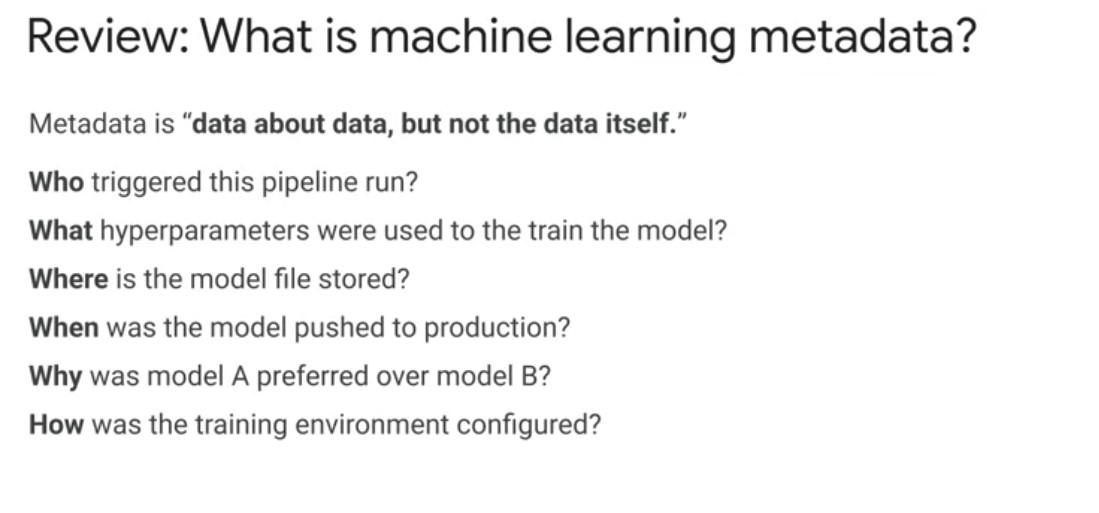 In this module, we will further discuss ML metadata for TFX
pipelines. As we have discussed in previous modules, ML metadata is a
key foundation of TFXs task and data ware pipeline
orchestration. Let’s take a closer look at how ML metadata
works. Machine learning metadata includes structured information about
your pipeline, models, and associated data. You can use metadata to
answer questions such as, who triggered this pipeline run? What
hyper-parameters were used to train the model? Where’s the model file
stored? When was the model pushed to production? Why was model A
preferred over model B? How was the training environment configured?
In this module, we will further discuss ML metadata for TFX
pipelines. As we have discussed in previous modules, ML metadata is a
key foundation of TFXs task and data ware pipeline
orchestration. Let’s take a closer look at how ML metadata
works. Machine learning metadata includes structured information about
your pipeline, models, and associated data. You can use metadata to
answer questions such as, who triggered this pipeline run? What
hyper-parameters were used to train the model? Where’s the model file
stored? When was the model pushed to production? Why was model A
preferred over model B? How was the training environment configured?
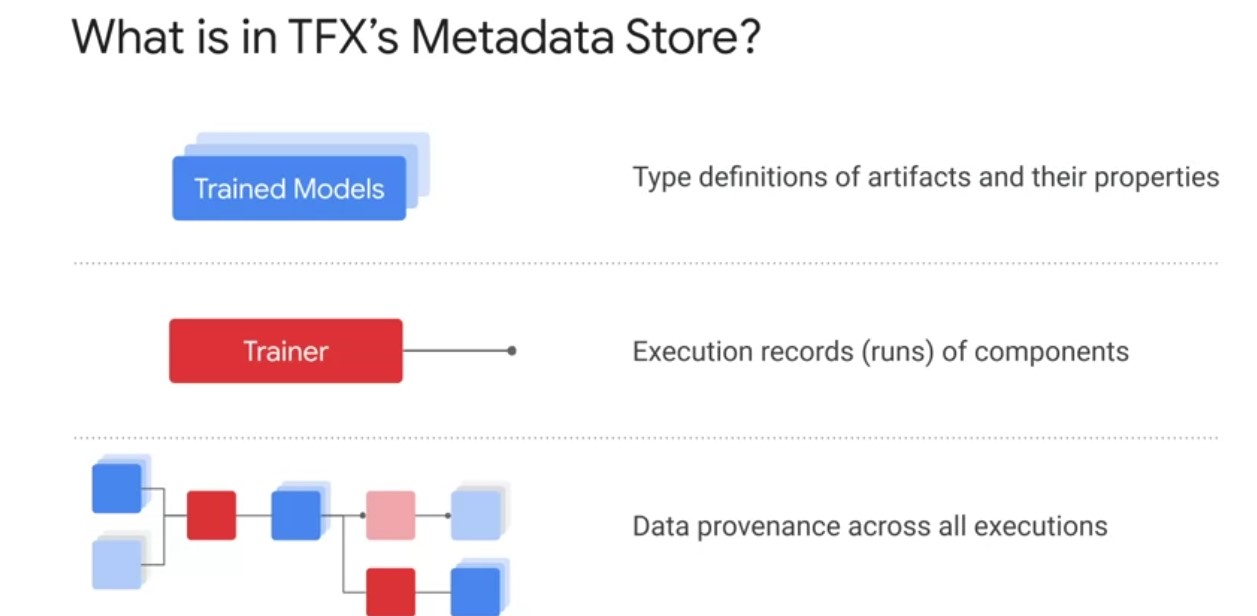
TFX pipeline Metadata Store. First, TFX’s Metadata Store has artifact type definitions and their properties. Your actual data will be stored along with other pipeline artifacts in Cloud Storage, and your TensorFlow saved model may be stored there also or host on AI platform prediction or a model repository such as AI hub. Second, it contains component execution records and associated runtime configurations, inputs and outputs, as well as artifacts. Third, TFX contains linkage records between artifacts. This enables full traceability to trace trained models back to their training runs and artifacts such as their original training data. The purpose of the model versioning and validation step is to keep track of which model, set of hyper-parameters, and datasets have been selected as the next version to be deployed. This is a key enabler of reproducibility for your machine learning experiments and also increasingly important for compliance with legal and regulatory requirements.
| Trace Source | TFX Pipeline caching | Reuse computed artefacts | Warm Start |
|---|---|---|---|
|
|
|
|
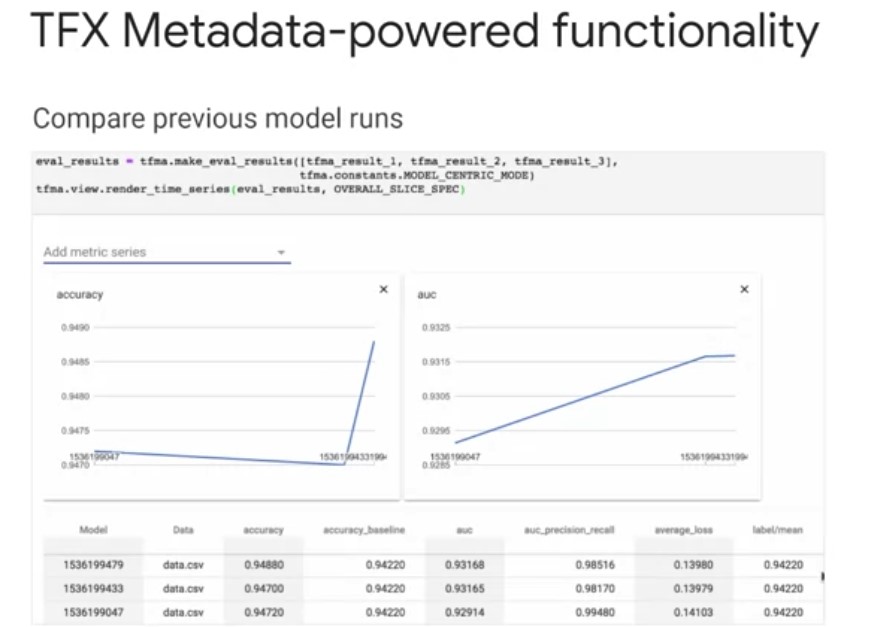
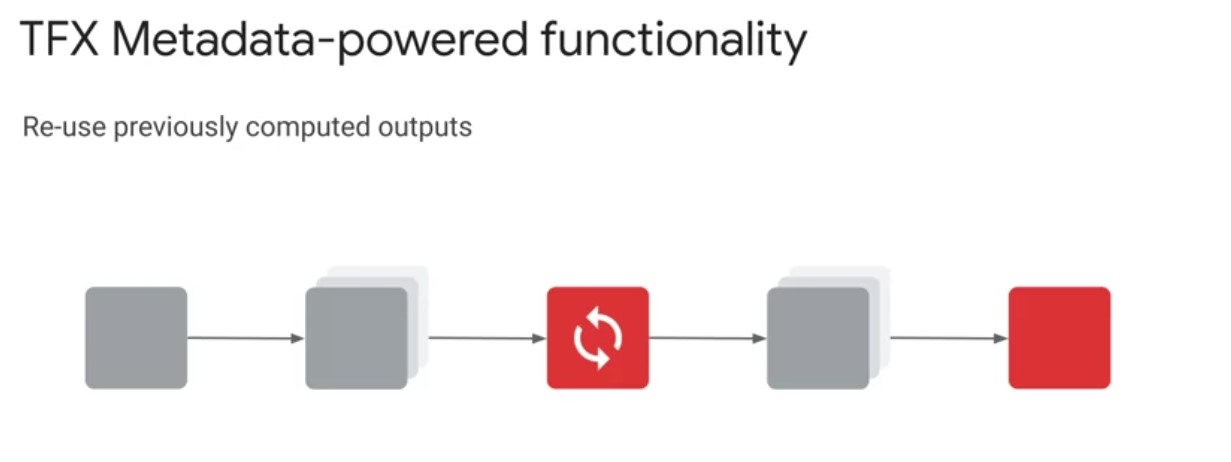
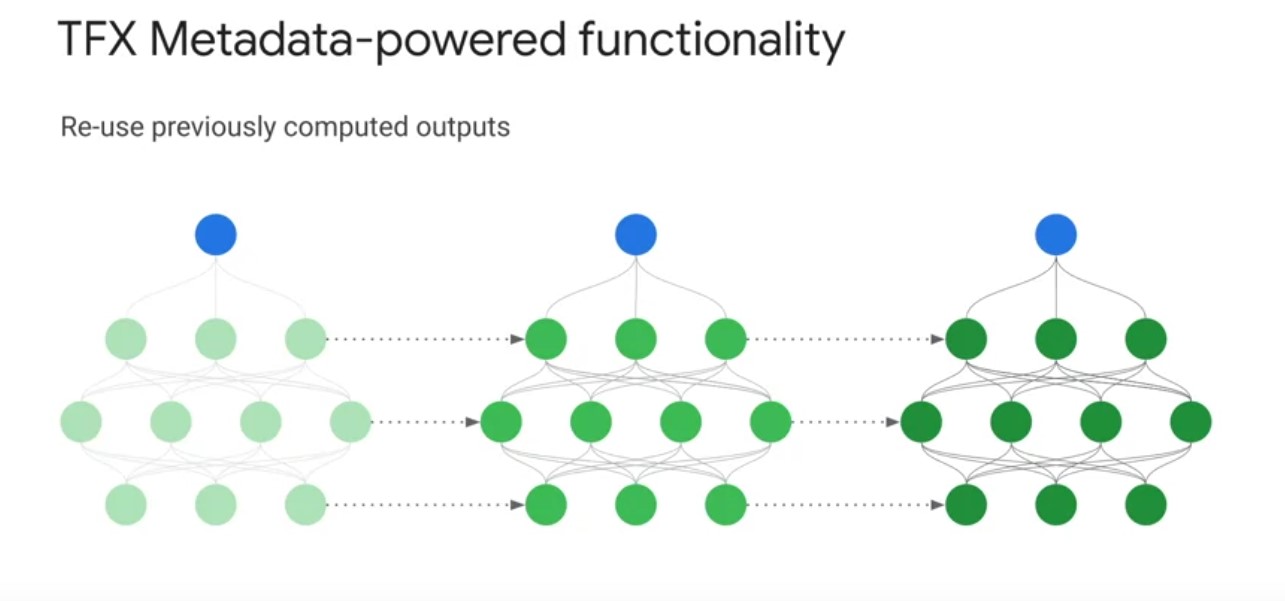
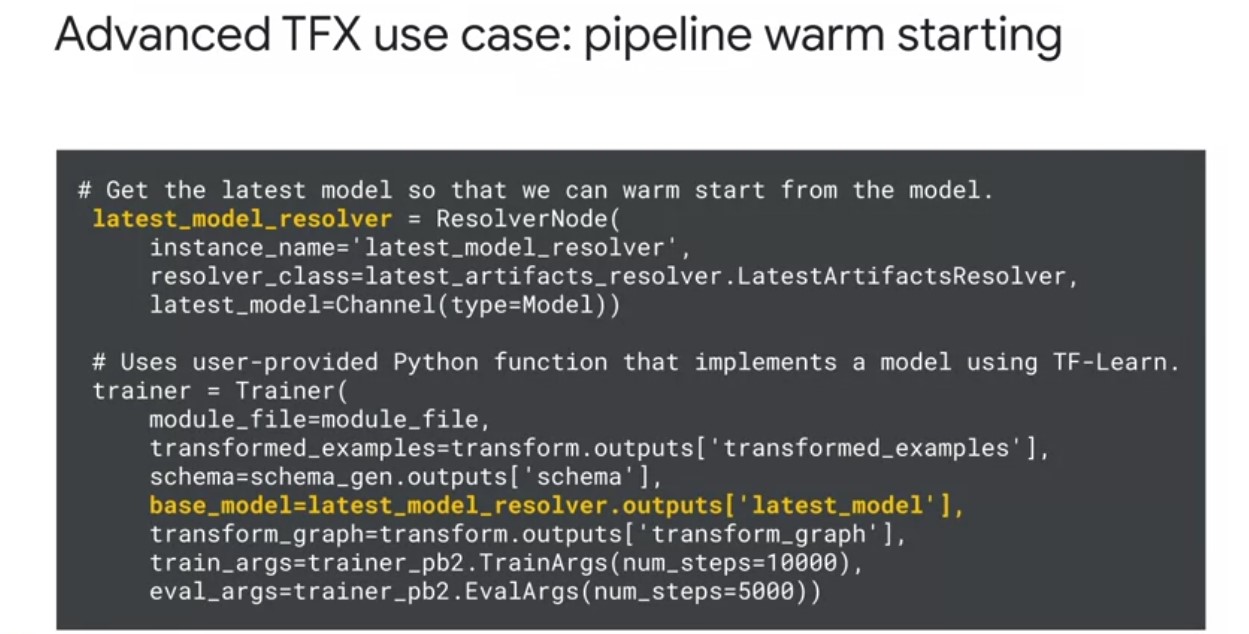
TFXs ML Metadata also enables you to systematically trace the source of modal improvements and degradation s. This example shows you how you can use previous model runs to compare model evaluation metrics in order to measure improvements and your model’s performance over time. Next, TFX pipeline caching, lets your pipeline skip over components that have been already executed with the same set of inputs in a previous pipeline run. If caching is enabled on your pipeline class instance, the pipeline reads ML metadata and attempts to match the signature of each component, the component and set of inputs to one of this pipelines previous component executions. If there is a match, the pipeline uses the components outputs from the previous run. If there is not a match, the component is executed. This provides you with significant savings on computation time and resources, instead of recomputing artifacts on every pipeline run. TFX metadata also lets you incorporate previously computed artifacts back into your pipeline. This enables a number of advanced use cases, including resuming model training from checkpoints. This is useful when a long model training procedure is interrupted and you need to reliably restart the training procedure to accurately update model weights. Benchmarking model components in the evaluator component, this lets you import the last [inaudible] model with the pipeline node to compute statistics, to compare it against the latest trained model in order to determine whether to push the latest trained model to serve in production.
TFXs ML Metadata also enables you to systematically trace the source of modal improvements and degradation s. This example shows you how you can use previous model runs to compare model evaluation metrics in order to measure improvements and your model’s performance over time. Next, TFX pipeline caching, lets your pipeline skip over components that have been already executed with the same set of inputs in a previous pipeline run. If caching is enabled on your pipeline class instance, the pipeline reads ML metadata and attempts to match the signature of each component, the component and set of inputs to one of this pipelines previous component executions. If there is a match, the pipeline uses the components outputs from the previous run. If there is not a match, the component is executed. This provides you with significant savings on computation time and resources, instead of recomputing artifacts on every pipeline run. TFX metadata also lets you incorporate previously computed artifacts back into your pipeline. This enables a number of advanced use cases, including resuming model training from checkpoints. This is useful when a long model training procedure is interrupted and you need to reliably restart the training procedure to accurately update model weights. Benchmarking model components in the evaluator component, this lets you import the last [inaudible] model with the pipeline node to compute statistics, to compare it against the latest trained model in order to determine whether to push the latest trained model to serve in production. Lastly, TFX Metadata enables one of my personal favorite advanced use cases, warm starting. Let’s briefly take a look at some pipeline code to configure warm starting and discuss some of its benefits. Traditionally, when training a neural network model, model weights are initialized to random values. Warm starting is a general alternative strategy where instead you initialize model weights by copying them from a previously trained model. This warm starting approach enables you to start training from a better initial point on the low surface, which often leads to higher performing models. In doing so, warm starting leverages prior computation to dramatically reduce model training time, as well as leading to significant computational resource savings, especially in a continuously training pipeline. Furthermore, you can incorporate larger models trained on general tasks from model repositories like TF hub into your pipeline to fine tune on specialized tasks. This is specialized case of warm starting, known as transfer learning that can improve your model performance on significantly less data. Incorporating warm starting into your TFX pipeline is straightforward. In the code on the slide, you can see the use of a resolver node to retrieve the latest plus model weights, and then how you can pass in these weights through the bass model argument in the trainer component.
TFX ML MetaData Model
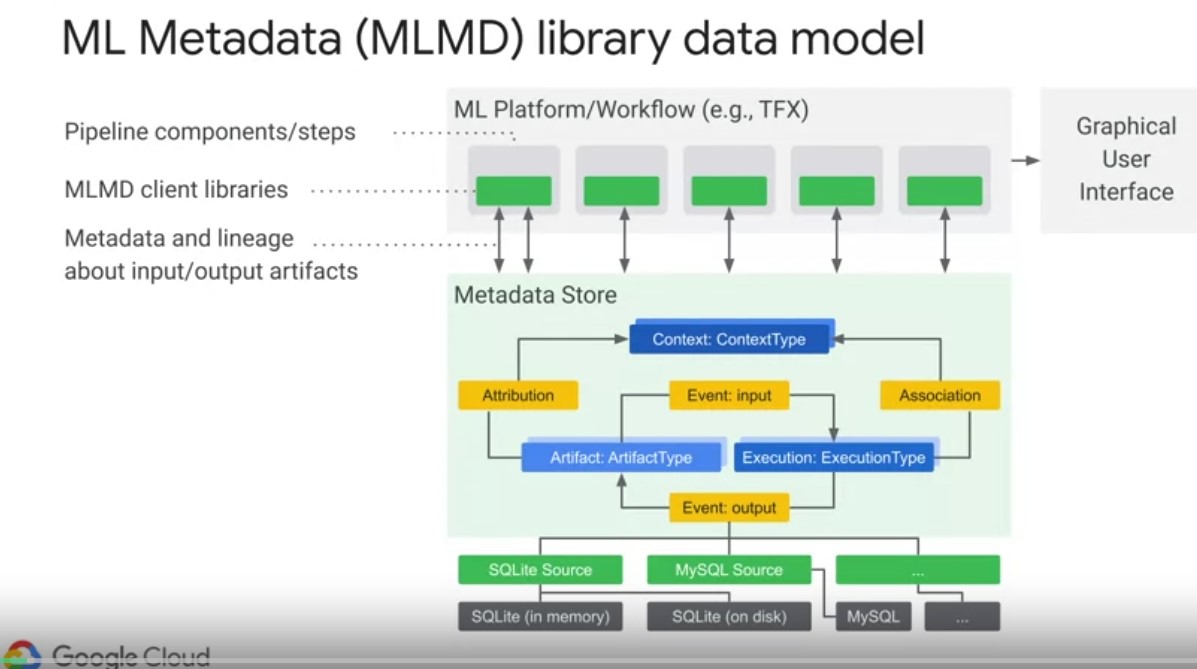
The MLM metadata library abbreviated as MLMD is an integral part of TFX for recording and retrieving ML metadata. So it’s an important horizontal layer to understand. Play video starting at ::12 and follow transcript0:12 It is also designed to be used independently of TFX and is evolving into a more general framework for standardizing experiment tracking across machine learning engineering and data science workflows. Most users interact with MLMD when examining the results of pipeline components, for example, in a UI on Google Cloud, or in a Jupiter Notebook. The diagram on the slide shows the components that are part of MLMD. The storage backend is pluggable, and can be extended MLMD provides reference implementations for SQL lite and MySQL, out of the box, the metadata store uses the following data model to record and retrieve metadata from the storage back end. Play video starting at ::55 and follow transcript0:55 An artifact type describes an artifacts data type. As well as its properties that are stored in the metadata store. Play video starting at :1:2 and follow transcript1:02 These types can be registered at runtime with the metadata store. Or they can be loaded into the store from a serialized format. After a type is registered, its definition is available throughout the lifetime of the metadata store. Play video starting at :1:18 and follow transcript1:18 Artifacts describe a specific instance of an artifact type and its properties that are written out to the store. Play video starting at :1:25 and follow transcript1:25 Execution types describe a type of component or step in a workflow and its runtime parameters. Play video starting at :1:32 and follow transcript1:32 Each execution then is a specific execution type record of a component run. So and its associated runtime parameters. Every time a developer runs in ML pipeline or step Executions are recorded for each one of these steps. Play video starting at :1:49 and follow transcript1:49 An Event is a record of the relationship between an Artifact and Executions. When an Execution happens, events record every Artifact that was used by the Execution and every Artifact that was produced. These event records are what allows for provenance tracking throughout an entire ML workflow. Play video starting at :2:8 and follow transcript2:08 By looking at all events, MLMD knows what executions happened and what artefacts were created as a result, and can recourse back from any artefact to all of its upstream inputs. Context types described types of conceptual groups of artefacts and executions in a workflow and its structured properties. For example, think projects pipeline runs, experiments and owners. A contact is a specific instance of a context type. It captures the shared information within a group. So think project name, change lists, commit ID, or experiment annotations. Play video starting at :2:44 and follow transcript2:44 Attributions are record of the relationship between artifacts and contexts. And lastly, associations are records of the relationships between executions and contexts. So let’s step through an example to better understand this data model in action
| MLMD Action& MetaStore | |
|---|---|
|
|
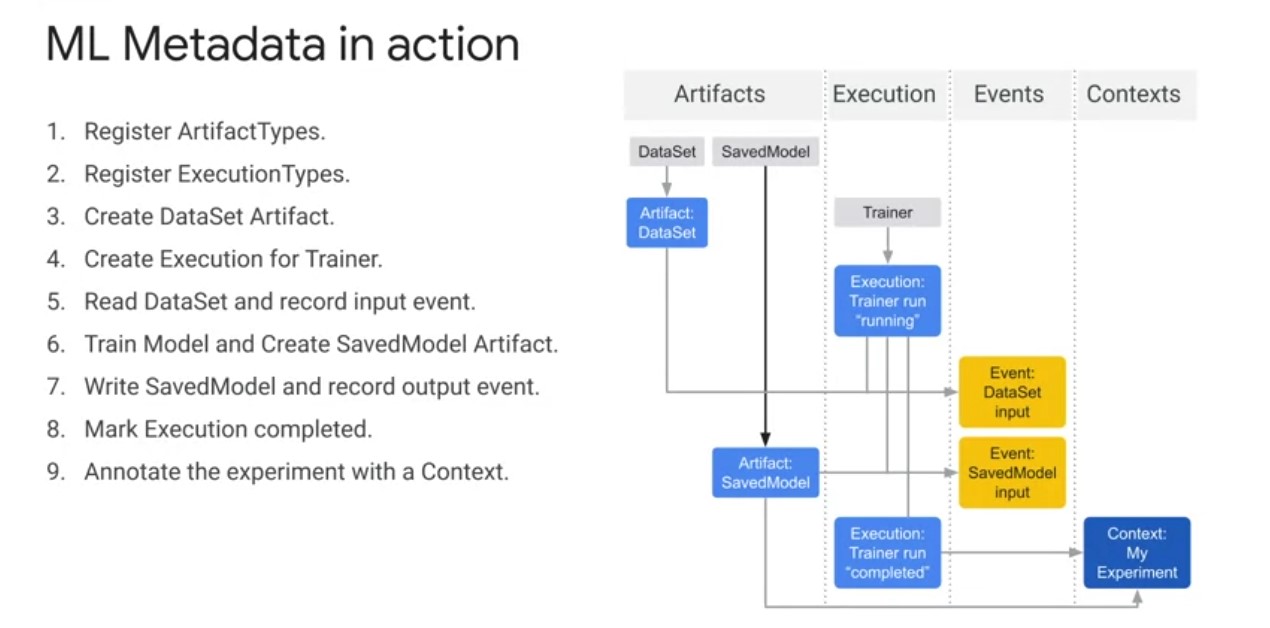
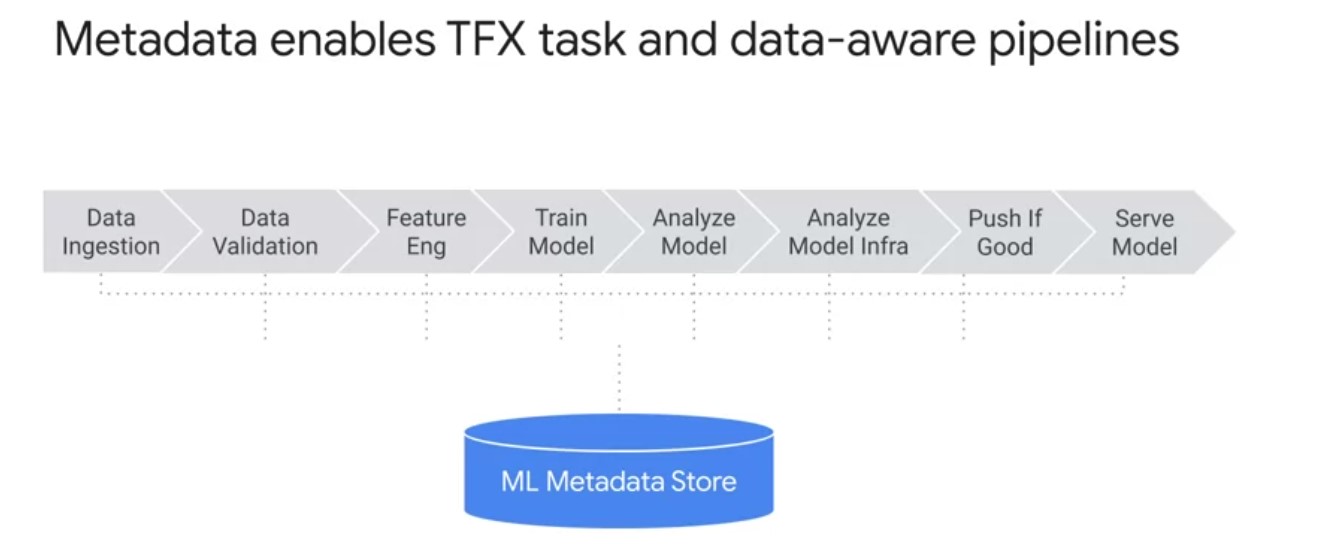
Before Executions can be recorded artifacts types must be registered with ML Metadata store. Furthermore, before executions can be recorded execution types must also be registered for all steps in the ML workflow. Play video starting at :3:16 and follow transcript3:16 After all types are registered, we can create a data set artifact. Play video starting at :3:21 and follow transcript3:21 We can then create an execution for a trainer run. Play video starting at :3:25 and follow transcript3:25 You can then declare input events and read the data. After the inputs are read by the trainer component, we can declare the output artifact. We then record the output event In the metadata store, now that everything is recorded the execution can be marked as completed. Then the artifacts and executions can be grouped to a context in this case, an experiment So in summary, TFX ml metadata is the foundational piece that enables TFX pipelines to be tasks and data were for increasing levels of automation of your machine learning workflows.