Alternatives to Anaconda
Overview:
Anaconda is one of the popular python distributions. Until recently, the individual repository could be freely used. However, recent changes to its terms of services prohibits free use of Anaconda repository.
Free use requirements have the following clauses.
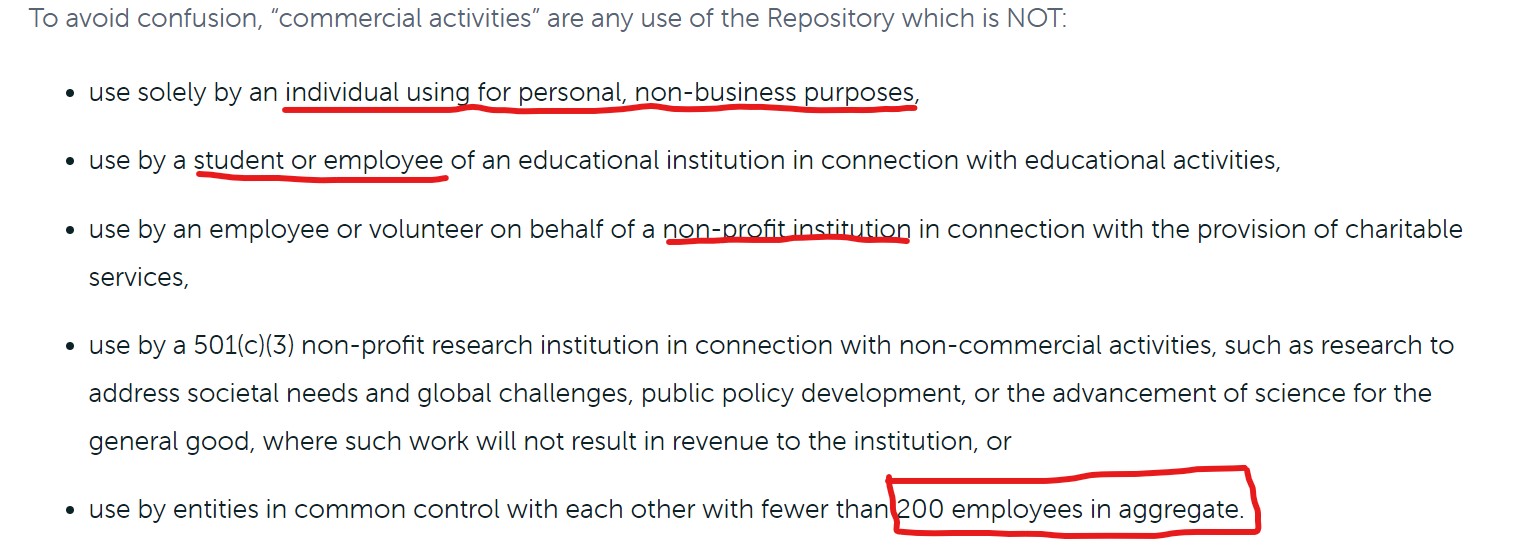
Even though this is applicable for the commercial version, the source code branches for some of these libaries are shared between individual edition and commercial version and thereby individual version is also not free anymore.
The rest of this post discusses advantages of using Anaconda and in its absence, alternate options and its related configurations.
Advantages of using Anaconda Distribution:
- Provides a package and environmental manager
- Excellent package dependencies
- Support for binary installers
- Brings all important and frequently used data science libraries
- Manages up to date package versions and conda channels/repos
- User friendly GUI support and tools such as spyder
- Multi OS support
Alternatives to Anaconda distribution:
I could explore three alternatives if we have to move away from Anaconda or Miniconda as python distributions. In no specific order, they are:
Installing packages from Conda-Forge Channel:
Conda forge is open source channel supported by Anaconda and
community driven. This channel has most of the latest versions of
the packages. However, we need an installer to pull the packages
from this channel and the supported installers are conda and
miniconda and both require licenses going forward.
To circumvent this, we have to first install ‘miniforge’, an open source installer from github and then using miniforge, install packages from conda-forge.
Steps to install miniforge:
- Install python from python.org
- Install miniforge from github
- Create a viritual environment and always install packages inside virtual environment so as not to break the base setup.
- Using conda-forge, manage package and environment dependences. Example: to install pandas from conda-forge, use the command `conda install -c conda-forge pandas`
Cons:
- No support for binaries
- No support for packages that are not in conda-forge channel
- Latest versions may not be available sometimes
Using ActiveState distribution
-
I have not explored this distribution. This one comes with its own installer, environment and packages. If one is used to conda syntax and CLI, there could be minor learning curve to use new set of commands related to ActiveState.
-
Biggest limitation with this distribution is that only one runtime instance of python should be run at any point in time. Depending one’s use cases, if one needs to spin more than one instance of python within 24 hours, this distribution would require license purchase.
Using python and pip
This is the simplest approach to create a pythonic environment for data science work. All it requires is install python.
- Once python is installed, we have to install two or three other tools before we start working on our data science workspace.
- One of the virtual environment manager. With python3, environment manager comes with it (venv) but there are other 3rd party environment managers also available if one prefers it such as (pip-env, virutalenv, poetry, etc).
- Install pip-tools to manage package dependencies
Pros:
- All the packages are free and open source
- pip-tools greatly enhances dependency management between packages
- Limited learning curve and very easy to use
Cons:
- Once the project management requirements become a bit more complex, pip-tools will start giving issues
- If we require packages from github, pip-tools may not manage the dependencies all the time
- Indirect dependency management could be an issue. Say we thought we wanted a stat package which in turn depends on another obscure package. Later when we decide we do not require stat package, the dependent obscure pakcage may be left in the system.
Summary
Anaconda seamlessly takes care of environment and package dependencies..though it may bloat our system with too many unwanted packages. With other tools, the user has to do some prep work to replicate more or less similar environment. Depending on users’s time, prior knowledge and comfort, this could take minimal to moderate effort if the user actively works on data science projects involving multiple packages and libraries.
If there is requirement to move the development between local and cloud or local and a datalake environment, the installation and package management steps may require replication efforts.